How to Structure a Claude Code Project in VSCode: Practical Guide

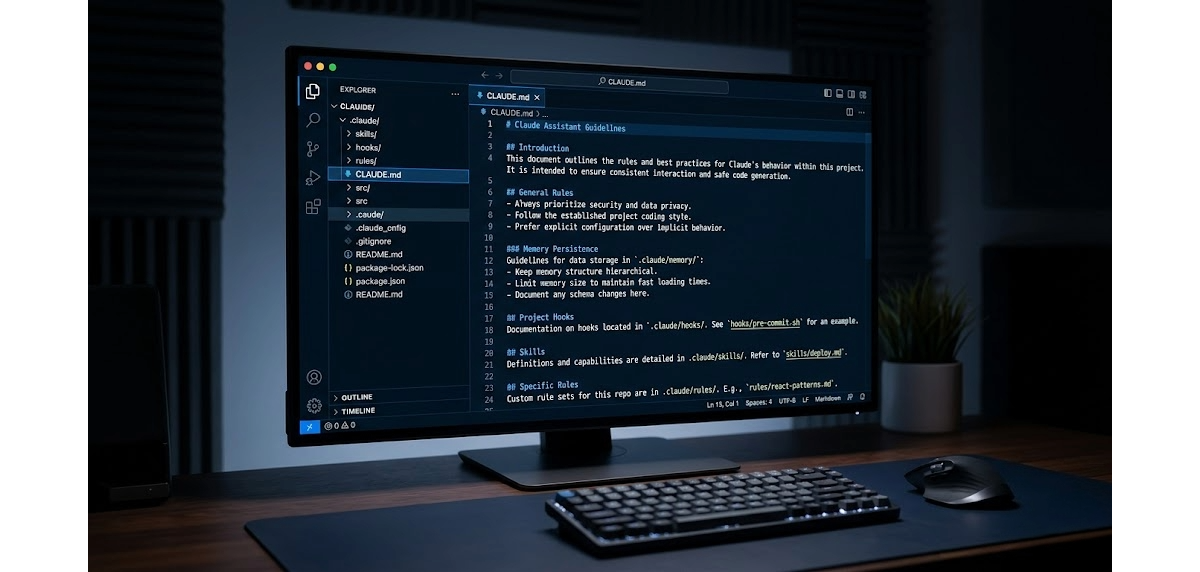
The structure of a Claude Code project in VSCode determines how well Claude understands your project, how reproducible behaviors are across sessions, and how quickly a new developer (or a new AI session) can operate without repeated explanations.
It's not a matter of aesthetics. A poorly structured project means instructions rewritten every time, skills that don't load, hooks that don't fire. A well-structured project works by itself: you open VSCode, launch Claude Code, and the assistant already knows where it is.
Infographics about Claude Code project structure circulate on the internet. Some are useful as a starting point, but contain errors in filenames and folder names (.cl Claude/ instead of .claude/, mcp.jason instead of .mcp.json, settings,json with a comma) that lead to silently broken configurations. In this guide you'll find the correct structure, with explanations of what you really need and what's optional.
What Is the Correct Structure of a Claude Code Project
The main folder is .claude/ in the project root. Everything related to Claude configuration for that project lives there.
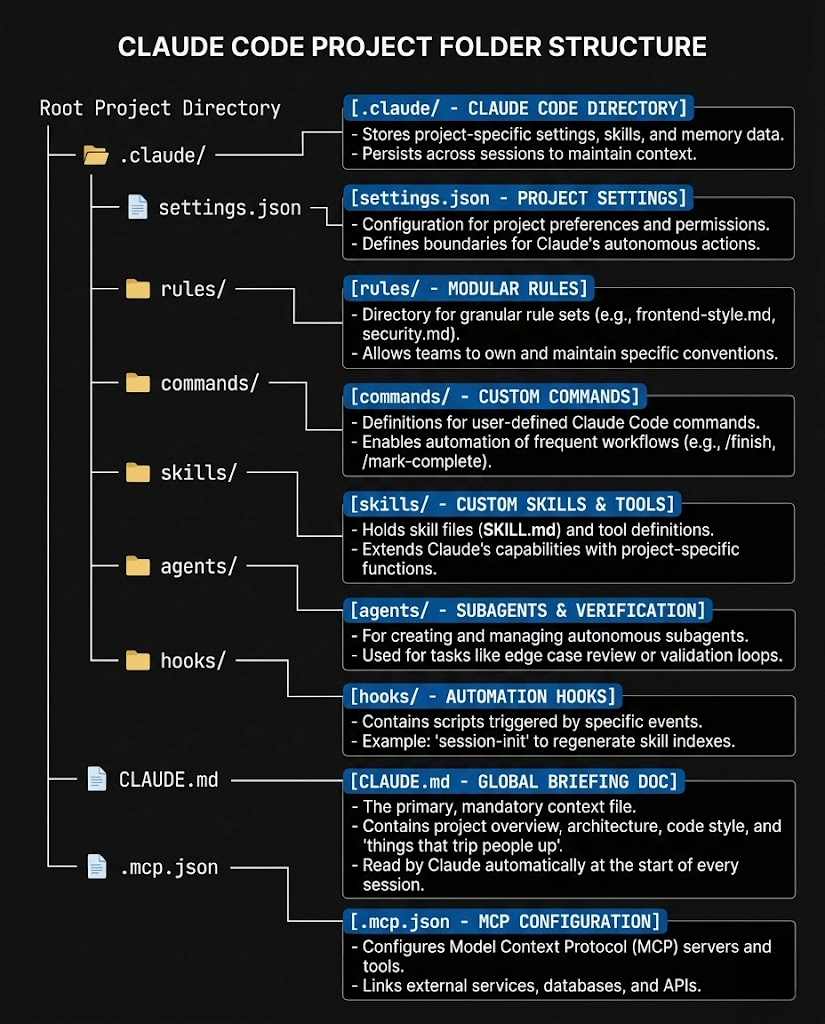
Important note: the correct folder name is .claude/ (all lowercase, with the dot). In infographics circulating online you often find .cl Claude/ or variations with spaces: these are errors, Claude Code doesn't recognize them.
What Each File and Folder Does
CLAUDE.md: Why It's the Most Important File in Your Project
It's the most important file. Claude reads it automatically at the start of each session, without you asking. It contains everything a developer (or a new AI session) must know before touching the code: tech stack, conventions, critical files, deploy workflow, naming rules.
The real value is in sharing: CLAUDE.md goes on git. Every developer who clones the project has the same base of context. In Castaldo Solutions projects, a well-structured CLAUDE.md cuts onboarding time in half: zero alignment sessions, zero instructions rewritten across different sessions.
Practical rule: if you find yourself explaining the same thing to Claude twice in different sessions, that thing goes in CLAUDE.md.
.mcp.json: Connection to External Systems
This file (not mcp.jason as you see in some infographics) configures the MCP servers active on the project. It defines which external tools Claude can use: databases, business APIs, CRM, GitHub, Jira, Slack.
{
  "mcpServers": {
    "vtenext": {
      "type": "stdio",
      "command": "node",
      "args": ["/path/mcp-vtenext/index.js"]
    }
  }
}
Goes on git if the MCP servers are shared with the team. If it contains credentials or local paths, goes in .gitignore.
settings.json and settings.local.json
settings.json defines permissions, tool access, and hooks for the project. Goes on git: it's the team's shared configuration.
settings.local.json is its local override. It's for personal settings that shouldn't end up in the repository: machine-specific paths, extra permissions for personal use, test configurations. Always goes in .gitignore.
This distinction is critical: confusing the two files leads to configurations that only work on the machine of whoever wrote them.
rules/: How to Keep Context Light with Modular Rules
Rules are markdown files that Claude loads when they're relevant to the current task. Unlike CLAUDE.md which loads every time, rules load only when the context requires them: if you're writing tests, Claude loads testing.md; if you're defining API endpoints, it loads api-conventions.md.
This is the mechanism that keeps context light: instead of loading everything at the start of each session, rules enter the context only when needed. A single well-written rule weighs 200-500 tokens versus 2,000-5,000 of a CLAUDE.md trying to cover everything.
commands/: How to Create Custom Slash Commands for Your Project
Files in commands/ become slash commands callable with /project:command-name within Claude Code. They're coded workflows for that specific project: /project:review for code review, /project:fix-issue for the standard bug fix pattern.
The difference from global skills: project commands live in the repository and are available only in that context. Global skills (in ~/.claude/skills/) are available everywhere.
skills/: Specialized Behaviors On-Demand
Project skills are structured instructions for specific tasks, loaded only when you invoke them. Each skill is a folder with a skill.md file at its center.
skills/
└── deploy/
    ├── skill.md          ← main instructions
    └── deploy-config.md  ← specific configuration
For a complete guide on building effective skills and best practices for refining them over time, read Claude Code Skills 2026: Complete Guide and Best Practices.
agents/: When to Use Subagents with Separate Roles
Agents are configurations for subagents with a defined role, specific tools, and model preferences. Unlike a skill that executes a task, an agent operates with an isolated context window and can have access to different tools than the main agent.
Typical examples: an agent for code review that has access only to the diff, a security auditor that can't modify files.
hooks/: How to Automate Validations and Block Unsafe Operations
Hooks are scripts that execute in response to Claude Code events: before or after using a tool, before a commit, after a write operation. They allow you to automate validations, linting, formatting, and block unsafe operations before they happen.
A typical hook: block direct writes to generated files (CSS compiled from Tailwind, build artifacts) and remind you to run the build before deploy.
What to Put on Git and What Not
| File | On git | Reason |
|---|---|---|
CLAUDE.md |
Yes | Shared project memory |
.mcp.json |
Depends | Yes if servers are shared, no if it contains local paths |
.claude/settings.json |
Yes | Shared team configuration |
.claude/settings.local.json |
No | Personal overrides |
.claude/rules/ |
Yes | Project conventions |
.claude/commands/ |
Yes | Coded workflows for the team |
.claude/skills/ |
Yes | Project assets |
.claude/agents/ |
Yes | Shared configurations |
.claude/hooks/ |
Yes | Project automations |
How to Get Started If You're Starting from Scratch
You don't need to create everything at once. The order I recommend:
- CLAUDE.md first, always. Even two lines: tech stack and critical files.
- settings.json as soon as you have a hook to configure or a permission to block.
- rules/ when you notice you're rewriting the same instructions on coding style or testing.
- skills/ for repetitive workflows you want to codify.
- agents/ and hooks/ when the project is mature and you have stable patterns to automate.
A well-written CLAUDE.md alone is worth more than a complete but superficial structure.
To see how these structures are applied on a real project, read the 8 skills from my daily workflow.
Does Anything Change with the Claude 5 Family (Fable 5 and Opus 5)?
No, and that is the best news. With the release of the Claude 5 family (Fable 5 is the first model of the new tier, above Opus in capability), the project structure described in this guide stays identical: .claude/, CLAUDE.md, skills, hooks, rules and .mcp.json work the same way. What changes is the model running them.
That is exactly why it pays to invest in structure rather than in the prompt of the day: a well-organized project went through the Claude 4 to Claude 5 transition without touching a single file. CLAUDE.md loads the same way, skills are invoked the same way, hooks fire on the same events. The infrastructure is the part of your workflow you do not throw away at every release.
Frequently Asked Questions about Claude Code Project Structure
What's the difference between CLAUDE.md and rules/ in Claude Code? CLAUDE.md loads at each session automatically: it contains the permanent context of your project. rules/ are modular files loaded only when the context requires them: coding style when you write code, testing when you write tests. CLAUDE.md is for rules always valid, rules/ is for rules specific to situations.
Should .mcp.json go on git?
It depends on the content. If it defines MCP servers shared with the team (like a VTENext server or a company database accessible to everyone), it goes on git. If it contains absolute local paths or credentials, it goes in .gitignore. Practical rule: use environment variables for credentials and put .mcp.json on git only with relative references or without secrets.
What's the difference between commands/ and skills/ in Claude Code?
Commands in commands/ are project slash commands callable with /project:name and typically execute workflows with shell execution. Skills in skills/ are structured instructions that configure specific behaviors and formats. In practice: a command does something (runs tests, creates a file), a skill tells Claude how to do it (with what structure, what tone, what conventions).
Does settings.local.json go on git?
No, never. settings.local.json contains personal overrides specific to your machine: absolute paths, extra permissions for your personal use, debug configurations. It goes in .gitignore. settings.json instead goes on git: it's the team's shared configuration.
Where do you start structuring a Claude Code project from scratch? From CLAUDE.md. Even two lines: tech stack and critical files of the project. The rest of the structure gets added when needed: settings.json as soon as you have a hook, rules/ when you repeat the same instructions, skills/ when you encode the first repetitive workflow. No need to create everything at once.
Does the project structure change with Claude Fable 5?
No. The Claude 5 family (Fable 5, Opus 5) uses the same project structure: .claude/, CLAUDE.md, skills, hooks and rules stay identical. A well-structured project moves from one model generation to the next without changes: the engine changes, not the chassis.
Want to set up this structure on your project with support from a consultant?