How to Build an AI Agent with n8n: Practical Guide for SMEs (2026)
How do you build a real AI Agent with n8n? In this guide I show three levels of complexity with workflows already in production: from a simple Telegram bot with spam filter (Level 0) to a B2B lead enrichment agent that searches LinkedIn profiles with Apify and updates Salesforce automatically (Level 1). With real metrics, system prompts, technical stack and advice on where to start if you're an SME.

TL;DR
An AI Agent in n8n is a workflow with an LLM at the center that can make decisions and act on external systems. There are three levels for SMEs: simple bot without tool use (Level 0, 4–8 hours of setup), agent with tool use on real data (Level 1, 16–40 hours), and agent with RAG on company knowledge base (Level 2). In this guide I show Levels 0 and 1 with workflows already in production, concrete metrics and complete technical stack.
What is an AI Agent in n8n
An AI Agent in n8n is a workflow node that integrates a Large Language Model as a decision-making engine, equipped with tools to interact with external systems: databases, CRM, APIs, communication channels. Unlike traditional chatbots, the agent doesn't just respond to messages: it evaluates context, chooses which action to take among available options, and acts autonomously. In n8n the node is called "AI Agent" and is available natively from version 1.x, with dedicated ports for Chat Model, Memory and Tools.
Prerequisite: if you're still evaluating which process to automate in your SME before choosing technology, first read the guide on AI automation for Italian SMEs. This guide assumes you've already identified the use case.
Bot vs AI Agent: The Distinction That Changes Everything
Before choosing which architecture to build, it's essential to understand the difference between a simple bot with LLM and a true AI Agent. Confusion between the two is one of the main causes of over-engineering (or under-engineering) in SME AI projects.
| Feature | Simple Bot (Level 0) | AI Agent (Level 1+) |
|---|---|---|
| Responds to messages | Yes | Yes |
| Follows fixed flow | Yes | No (reasons about context) |
| Makes autonomous decisions | No | Yes |
| Uses external tools/APIs | No | Yes |
| Memory between sessions | Limited (Simple Memory) | Yes (Simple Memory, Redis, Postgres) |
| Acts on CRM or database | No | Yes |
| n8n setup complexity | Low (4–8 hours) | Medium–High (16–120 hours) |
| Typical LLM API cost | 10–30€/month | 30–150€/month |
The choice depends on the problem to solve, not the most advanced technology available.
The Three Complexity Levels of AI Agents in n8n
For Italian SMEs I've identified three levels of progression that balance achievable results and implementation effort.
| Level | n8n Architecture | Typical Use Case | Estimated Setup |
|---|---|---|---|
| 0: Simple Bot | Trigger → Filter → AI Agent (no tool) → Output | Telegram/WhatsApp assistant, FAQ response | 4–8 hours |
| 1: Agent with Tool Use | Trigger → Multi-source search → AI Agent (with tool) → CRM Action | Lead enrichment, support with structured knowledge base | 16–40 hours |
| 2: RAG | Trigger → Vector retrieval → AI Agent → Output | FAQ from company documents, assistant on technical specs | 40–120 hours |
Practical rule: always start with the lowest level that solves your problem. Additional complexity brings value only if the problem explicitly requires it.
Level 0: The Simple Bot Claira on Telegram
What You Get
An AI assistant that responds autonomously to Telegram messages 24/7, automatically filters spam and non-relevant requests, and converts approximately 1 in 10 conversations into a real appointment. Zero human intervention for routine messages. Setup time: one working week.
How It Works
Claira is the personal Telegram bot I use in production to manage initial commercial interactions. The n8n workflow follows this five-node architecture:
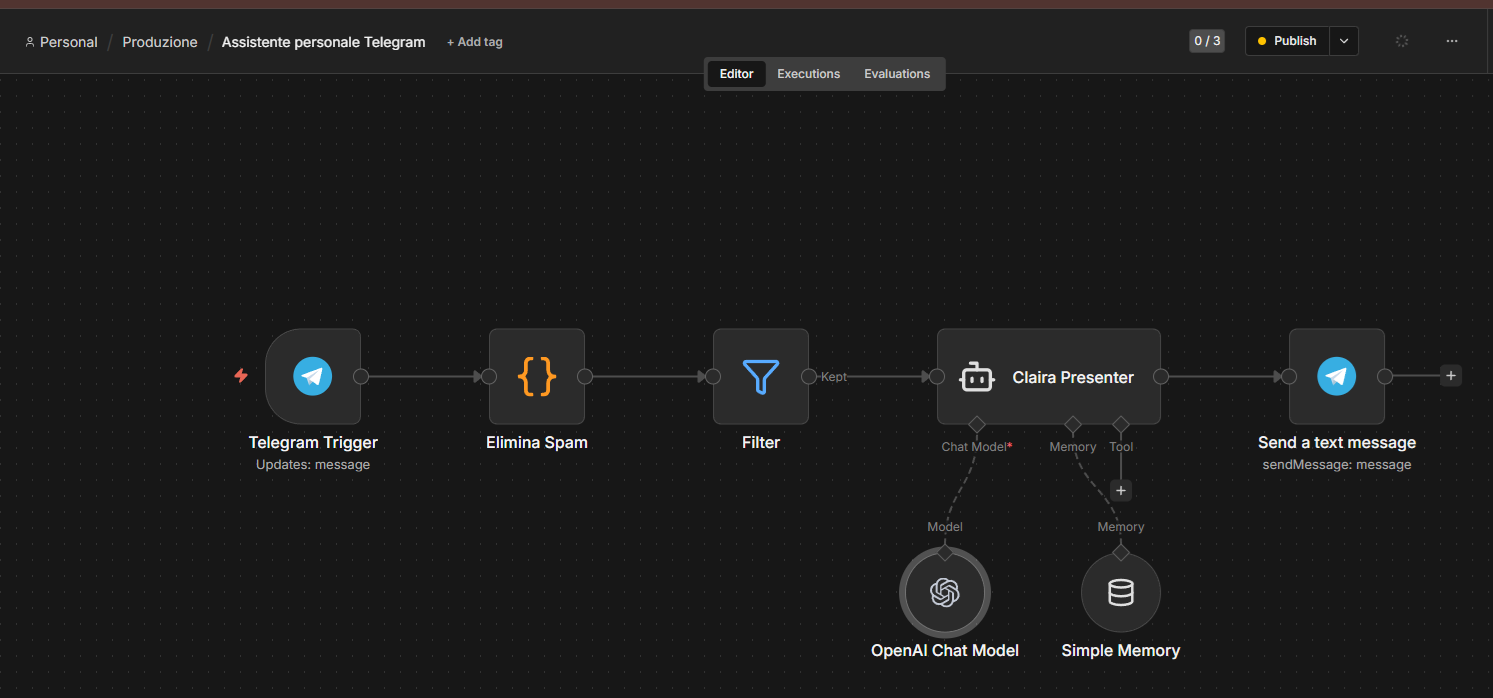
Node flow (left to right):
-
Telegram Trigger: listens for new incoming messages (
Updates: message). Each update includes text, sender ID, chat type and Telegram metadata. -
Remove Spam (JS Code node): extracts structured data from Telegram payload and evaluates spam criteria. Produces a boolean
_isSpamfield that the next node uses to route flow. -
Filter: native n8n node. Condition:
_isSpam = false→ pathKepttowards the agent. Spam messages are discarded silently (no response means no engagement with spammer). -
Claira Presenter (AI Agent): the central node. Has two connected sub-nodes:
- OpenAI Chat Model: the LLM (GPT-4o) that generates responses
- Simple Memory: maintains conversation context between successive messages from the same user
- No tool connected: this is Level 0, the agent works only with system prompt and memory
-
Send a text message (Telegram): sends the response to the sender via
sendMessage.
Technical note: Level 0 doesn't use tool use. The agent works exclusively with information in the system prompt and conversation history. This makes it fast to build, stable in production, and predictable in behavior.
The Spam Filter: Code from "Remove Spam" Node
The Code node extracts metadata from the Telegram payload and produces flags necessary for the Filter node downstream. Spam criteria are fully customizable: you can add keywords, block anonymous users, or apply rules based on message type.
// n8n Code Node: Remove Spam
// Extracts Telegram message and evaluates custom spam criteria

const update = $input.first().json;
const text = (update.message?.text || '').toLowerCase().trim();
const from = update.message?.from;

// Spam criteria: customize based on your use case
const spamSignals = {
  containsSpamKeywords: ['earn', 'click here', 'exclusive offer', 'wh4tsapp'].some(
    k => text.includes(k)
  ),
  isTooShort: text.length < 3,
  isAnonymous: !from?.username && !from?.first_name,
};

const isSpam = Object.values(spamSignals).some(Boolean);

return [{
  json: {
    ...update,
    _isSpam: isSpam,
    _spamReasons: Object.entries(spamSignals)
      .filter(([, v]) => v)
      .map(([k]) => k),
  },
}];
The Filter node downstream uses the condition _isSpam = false to route only legitimate messages towards Claira.
Real Production Results
| Metric | Value |
|---|---|
| Spam messages filtered by system | 95% |
| Conversion rate to appointment | 1 in 10 conversations |
| Human intervention for routine messages | 0 |
| Estimated LLM API cost (consulting company case) | ~5–15€/month |
Level 1: Agent with Tool Use: B2B Lead Enrichment
What You Get (for the CEO)
Every new lead entered in Salesforce is automatically enriched: the agent searches for the contact's LinkedIn profile (first via Google, then direct scraping), extracts company information and generates a personalized Ice Breaker (a custom hook for the first email or call), matching the lead to the most relevant service in your catalog. The Salesforce record is updated automatically, with no human intervention.
How It Works (for the Developer)
This is the complexity jump compared to Level 0: the agent doesn't respond to messages but reacts to a business event (new lead in CRM) and executes a multi-source search sequence before making a decision and taking action.
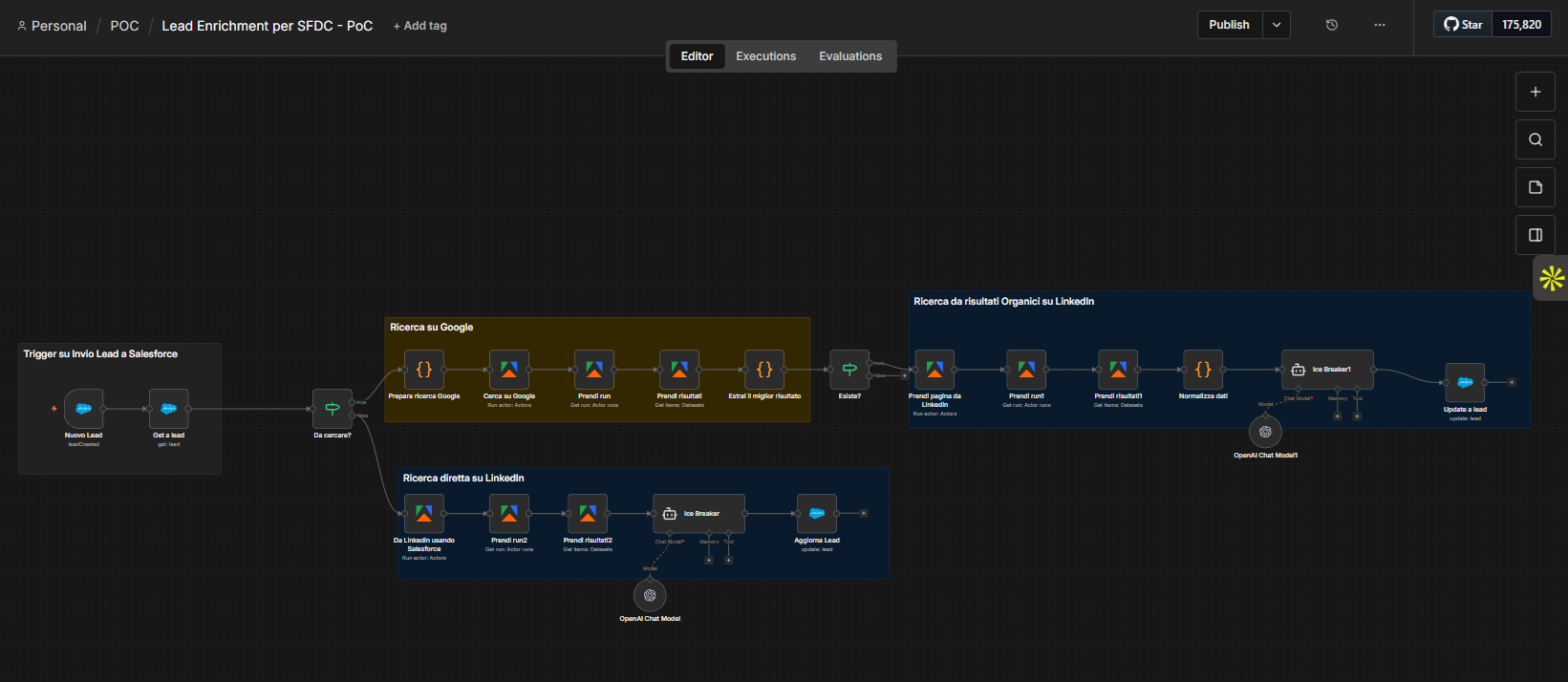
Technical stack:
- Trigger: Salesforce webhook (
leadCreated) - Google Search: Apify Actor (Google Search): searches
{name} {company} site:linkedin.com - LinkedIn Scraping: Apify Actor (LinkedIn Profile Scraper): extracts public data from found profile
- AI Agent: GPT-4o with dedicated system prompt for Ice Breaker
- Output: Lead record update in Salesforce with Ice Breaker and recommended service
Key technical detail: the async Apify pattern:
Each Apify call requires three distinct nodes in n8n because Actors are asynchronous:
- Run action: Actors: starts the Actor (returns immediately with a
runId) - Get run: Actor runs: polling until completion (n8n waits for response)
- Get items: Datasets: retrieves results from the Actor's dataset
This explains why in the workflow you see three Apify blocks for each search phase (Google and LinkedIn).
Complete decision flow:
New Lead (SFDC)
    ↓
Get a lead (SFDC)
    ↓
To search? [filter on LinkedIn URL presence in record]
    │
    ├── [LinkedIn URL absent] → PATH 1: Google Search
    │       ↓
    │   Prepare Google search (Code node: builds query)
    │       ↓
    │   Search Google (Apify Actor) → Get run → Get results
    │       ↓
    │   Extract best result (Code node: parse Apify JSON)
    │       ↓
    │   LinkedIn URL exists? [filter]
    │       ↓ (yes)
    │   Get page from LinkedIn (Apify Actor) → Get run1 → Get results1
    │       ↓
    │   Normalize data (Code node: standardize Apify output)
    │       ↓
    │   Ice Breaker1 (AI Agent + OpenAI)
    │       ↓
    │   Update a lead (SFDC)
    │
    └── [LinkedIn URL present in SFDC] → PATH 2: Direct LinkedIn Search
            ↓
        From LinkedIn using Salesforce (Apify Actor with URL from CRM)
            → Get run2 → Get results2
            ↓
        Ice Breaker (AI Agent + OpenAI separate)
            ↓
        Update Lead (SFDC)
Note: the two Ice Breakers (Path 1 and Path 2) are separate agents: this is intentional. They allow independent optimization of the system prompt for the two contexts (data enriched from Google+LinkedIn vs data only from direct LinkedIn).
The Ice Breaker System Prompt
The system prompt is the agent's heart. The structure I use:
You are an AI commercial assistant for Castaldo Solutions.

You receive updated data on a B2B lead and must:
1. Identify the most relevant service from the catalog for that lead
2. Write a personalized Ice Breaker (max 2 lines, professional and direct tone)
3. Briefly explain why this choice

AVAILABLE INPUT:
- Name and role: {{$json.firstName}} {{$json.lastName}}, {{$json.title}}
- Company: {{$json.company}}, sector {{$json.industry}}
- LinkedIn profile summary: {{$json.linkedinSummary}}

SERVICE CATALOG:
{{$json.servicesCatalog}}

REQUIRED OUTPUT (only valid JSON, no text outside JSON):
{
  "bestService": "exact service name from catalog",
  "iceBreaker": "text ready for email or call opening",
  "rationale": "why this service for this specific lead"
}

Rules: don't invent data not present in input. If profile is incomplete,
flag it in rationale field and still propose the most probable service.
The most important variable is
servicesCatalog. The more descriptive and specific the catalog provided in input, the more accurate and contextual the Ice Breaker is. A generic catalog produces generic Ice Breakers. This is the calibration point with the highest ROI.
Real Production Results
| Metric | Value |
|---|---|
| B2B leads with LinkedIn profile found | 85% (within 2 search paths) |
| Contextually effective Ice Breaker | ~100% with well-configured service catalog |
| Leads requiring manual intervention | 15% (not found on LinkedIn) |
| Time per enriched lead | ~90 seconds (vs 20–30 minutes manual) |
Level 2: RAG and Fine Tuning: The Next Step
Beyond Levels 0 and 1 exists a third complexity level: Retrieval-Augmented Generation (RAG). In this scenario the agent doesn't work only with structured data (messages, CRM records) but queries a vector knowledge base (company documents, technical specs, contracts, manuals) to answer complex questions or generate context-aware outputs.
n8n natively supports integration with Pinecone, Qdrant, Supabase pgvector and other vector stores. The setup requires more elaborate infrastructure: document chunking, embedding generation, knowledge base update management. Initial investment is 40–120 hours.
Fine tuning (training a model on proprietary company data) is an even more advanced step, outside scope for most Italian SMEs in 2026 due to costs and complexity.
I'll dedicate a separate article to RAG with n8n. If you want to be notified, contact me.
How to Choose the Right Level for Your SME
| If your objective is... | Start from Level |
|---|---|
| Respond to Telegram or WhatsApp messages with AI | 0 |
| Filter requests, manage FAQ, pre-qualify leads via chat | 0 |
| Automatically enrich CRM data | 1 |
| Generate personalized content from structured data | 1 |
| Automate multi-source searches and decisions based on results | 1 |
| Create an assistant that responds on company documents | 2 |
| Automate analysis of contracts or technical specs | 2 |
Level 0 is the zero milestone: a working automation in a few days that provides immediate value and trains the team on using AI agents. Level 1 is the first step toward automating a structured business process. Level 2 is justified only when the volume and variety of unstructured data make RAG necessary, not optional.
If you're unsure which level suits your situation, that's exactly the type of analysis we do in a consulting call. Discover our AI services →
How to Build Your First AI Agent in n8n: 5 Steps
Step 1: Choose the Trigger
Every agent starts from an event. The most common triggers in n8n for SMEs:
- Telegram Trigger / WhatsApp: for conversational bots (Level 0)
- Salesforce Trigger / HubSpot: for CRM-driven automations (Level 1)
- Webhook: for integrations with any system that supports HTTP
- Schedule Trigger: for periodic tasks (batch enrichment, reporting)
The trigger determines which data is available in the $input node, and therefore what the agent can reason about.
Step 2: Configure the AI Agent Node
The AI Agent node in n8n has three optional input ports:
- Chat Model* (mandatory): the LLM: OpenAI GPT-4o, Anthropic Claude, Google Gemini, Ollama (self-hosted for sensitive data)
- Memory: for multi-turn context: Simple Memory (in-memory, reset on restart), Redis or Postgres (persistent)
- Tool: for external system actions: any n8n node can become a tool
For Level 0: connect only Chat Model + Memory. For Level 1: add the Tools you need.
Step 3: Write the System Prompt
This is the most important part, and most underestimated. An effective system prompt must:
- Define the exact role of the agent
- Specify the objective and explicit constraints ("don't invent data", "respond only in English")
- Define the output format (JSON structured for downstream processing)
- Inject variable data via n8n expressions:
{{$json.fieldName}}
Step 4: Add Tools (Level 1+)
Each tool must have:
- A descriptive name: the LLM uses it to decide when to invoke
- A clear description of what it does and when to use it
- Correctly mapped inputs to n8n expressions
Starting point: use the minimum number of tools possible. Each tool added increases complexity of LLM reasoning and risk of wrong choices.
Step 5: Test, Monitor and Calibrate
The first weeks after go-live are calibration:
- Collect cases where the agent produces wrong or unexpected output
- Analyze if the problem is in the system prompt, input data, or tool logic
- Update the prompt and retest
- Repeat until error rate is acceptable for your use case
The Most Common Mistakes When Building AI Agents in n8n
Based on real projects with Italian SMEs:
-
System prompt too generic. "Be a helpful AI assistant" doesn't work. The agent must know exactly what to do, in what format, and when to stop. A specific prompt outweighs a more expensive LLM.
-
No control over output. If the agent returns free text and the next node expects JSON, the workflow breaks in production. Always specify output format and add a parsing node (Code node) after the agent.
-
Memory not configured for conversational bots. Without Memory, each message is treated as a new conversation. Users must repeat context every time: poor UX and inconsistent responses.
-
Tools too powerful without guardrails. An agent that can write directly to a production CRM without validation is risky. Always add a verification node or value filter before final action on critical systems.
-
Not testing with real data before go-live. Real production data is almost always messier, more incomplete or unexpected than mocked test data. Test with a sample of real data before activating the automation at full scale.
FAQ on Building AI Agents in n8n
What is an AI Agent in n8n and what distinguishes it from a chatbot? An AI Agent in n8n is a workflow node that uses an LLM as a reasoning engine, with the ability to invoke external tools to interact with business systems. Unlike a traditional chatbot that only responds to messages, an AI Agent makes autonomous decisions (decides which tool to use, in what order, and when to stop) and acts on databases, CRM and APIs without human intervention.
Is n8n really free for SMEs? n8n Community Edition is free and open-source, with unlimited executions and workflows. The real cost is the infrastructure you host it on: an adequate VPS costs 5-40 euros per month on European providers like Hetzner or OVH. You also need technical expertise for installation and maintenance. If you prefer avoiding infrastructure management, cloud plans start around 20 euros per month for 2,500 executions.
What's the difference between n8n and Zapier for building AI Agents? Zapier is simpler but doesn't have a native AI Agent node with tool use and manageable memory. n8n is more powerful for complex workflows with LLM: it supports JavaScript/Python code in Code nodes, multi-turn memory management, real tool use, and self-hosting for sensitive data. With 175,000+ GitHub stars (February 2026) it has a very active technical community and rapidly growing template ecosystem.
Do you need a programmer to use n8n? For Level 0 (simple bot), no: basic setup happens via GUI and simple Code nodes. For Level 1 (tool use, conditional logic, output parsing, async APIs like Apify), you need basic knowledge of JSON, JavaScript and the APIs to integrate. For Level 2 (RAG, vector store), a developer or specialized partner is recommended.
How does n8n integrate with Salesforce? n8n has a native Salesforce node supporting main CRUD operations (create, read, update, delete) on Lead, Contact, Account, Opportunity and other standard objects. Authentication uses OAuth 2.0. For event-based triggers (e.g., "new lead created"), use a Salesforce Trigger node that polls, or configure an outbound message from Salesforce to an n8n webhook for more immediate response.
How long does it take to build an AI Agent in n8n? Level 0 (simple Telegram bot): 4–8 hours for those with n8n experience. Level 1 (agent with tool use on CRM): 16–40 hours including testing and prompt calibration, with Apify + Salesforce integration. Level 2 (RAG with vector store): 40–120 hours including data preparation, chunking and knowledge base embedding.
Which LLM to use in n8n for Italian SMEs? GPT-4o (OpenAI) is the most common choice for quality and reliability, with excellent Italian multilingual support. For use cases with sensitive data that must not leave company infrastructure, Ollama with open-source models (Llama 3.3, Mistral Large) on self-hosted VPS is the alternative. Claude 3.5 Sonnet (Anthropic) is excellent for tasks requiring complex reasoning and long structured outputs. Estimated cost for an SME with moderate volume: 20–100€/month for cloud models.
Conclusion
Building an AI Agent with n8n doesn't require a machine learning degree or an enterprise budget. It requires clarity on the process to automate, a well-constructed system prompt, and a few weeks of calibration in production.
The recommended path for an Italian SME in 2026:
-
Start with Level 0: a Telegram or WhatsApp bot connected to an LLM. It teaches you how n8n works, how to write effective prompts and how to measure results. Completable in one working week, already in production with Claira.
-
Move to Level 1 when you have a CRM-driven process to automate: lead enrichment, data enrichment, content generation from structured data. Requires 2–4 weeks and at least a semi-technical profile or specialized partner.
-
Consider RAG (Level 2) only if you have a real knowledge retrieval problem: dense company documents, complex FAQs, voluminous internal knowledge base. It's not the right starting point for most SMEs.
To explore which AI service best suits your company and which process has the highest ROI in your specific context, discover our AI services →
If you prefer to discuss it directly, contact us here: in a 45-minute call we can almost always identify the right level and the process with the fastest economic return.