Claude Code in business: 7 controls to use AI without creating technical debt
Claude Code can speed up software development, but only if it enters a controlled process. Here are the 7 controls I use to turn AI from a shortcut into a method.


TL;DR
Claude Code can genuinely speed up software development. But if you only use it to write more code, you risk speeding up bugs, rework and technical debt too.
The point is not asking the AI to "implement a feature". The point is deciding which controls stay mandatory before, during and after the code is generated.
In the way I work, Claude Code enters a pipeline with 7 controls:
- context before code;
- explicit technical choice;
- verifiable operational plan;
- assisted and orchestrated development;
- tests as a contract;
- separate review on specification and quality;
- tracked release.
This structure is not needed for every micro-change. It is needed when the task touches multiple files, critical logic, integrations, data, permissions, security or business processes.
For an SME the advantage is not "making AI work instead of the developers". It is reducing the risk of quickly building something that then costs twice as much to fix.
The problem is not making AI write code
Over the past few months, tools like Claude Code have made one thing much more concrete: AI is no longer just a chat where you paste pieces of code.
Anthropic's official documentation describes it as an agentic tool that lives in the terminal, reads codebases, helps modify files, run commands, work with Git and support real development flows.
This is powerful.
But precisely because it is powerful, it becomes dangerous to use without method.
The pattern I often see is this:
"Implement this thing."
The AI starts, modifies files, fixes one error, creates another, adjusts a test, changes approach, proposes a patch, then another. In the end something works.
The problem is that it is often unclear:
- why that solution was chosen;
- which alternatives were discarded;
- which files are really involved;
- which tests prove the behavior is correct;
- which risks remained open.
When this happens, you did not do AI-assisted software engineering.
You did accelerated development without control.
From a better prompt to a better process
Writing better prompts helps, but it is not enough.
A prompt can make a request clearer. A pipeline makes the work clearer.
The difference matters.
If you ask Claude Code to write code without a process, the AI will still try to be useful. But it will tend to fill the gaps: it interprets implicit requirements, assumes conventions, decides priorities, changes files, fixes errors.
In a personal project this can be fine.
In a business project it is not.
In business you have to know where automation ends and human control begins. You have to be able to explain why you chose a path, how you verified the result and what happens if something does not add up.
This is why I prefer to talk about controls, not only phases.
A phase says what you do.
A control says what you cannot skip.
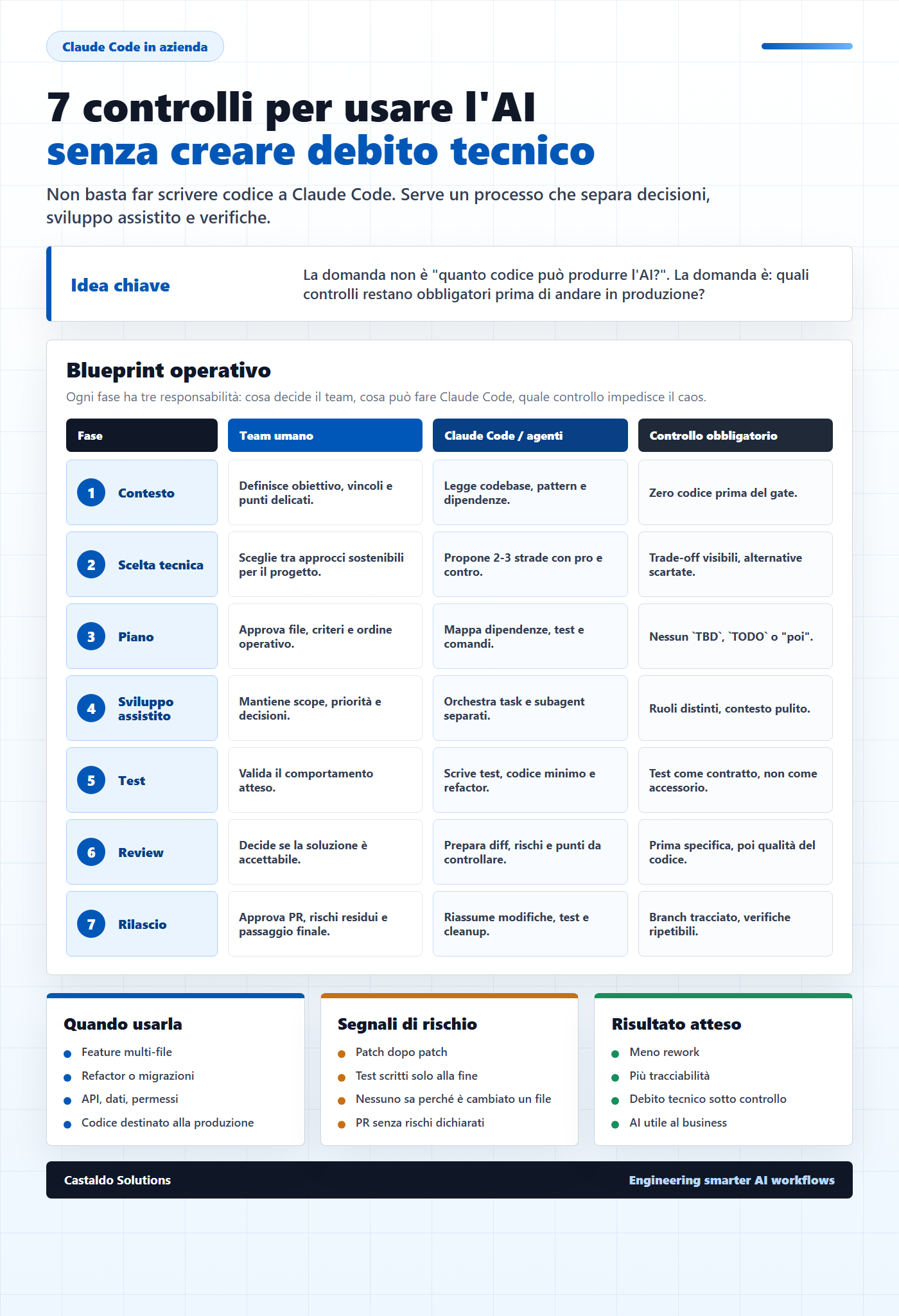
The 7 controls to use Claude Code without creating technical debt
This is not a checklist to apply rigidly every time.
If you have to change a label, fix a typo or correct a small CSS class, it would be overkill.
But when you are working on multi-file features, refactors, complex bugs, integrations or logic that will end up in production, these controls become the difference between speed and chaos.
1. Context before code
The first control is simple: Claude Code should not write code before understanding the context.
This means reading the project structure, identifying existing patterns, understanding technical constraints, dependencies, conventions and sensitive points.
Here the AI must ask questions.
Not ten all at once. One at a time, when they are really needed.
The expected result is not a patch yet. It is a reading of the problem:
- which parts of the system seem involved;
- which constraints exist;
- what is missing to decide;
- which initial risks are already visible.
If this step is weak, code arrives before reasoning.
And code written too early is often the first piece of technical debt.
2. Explicit technical choice
Before implementing, I want to see at least two or three possible approaches.
Not to do theory.
To prevent the AI from automatically choosing the first plausible path.
A good technical choice should clarify:
- the recommended solution;
- the discarded alternatives;
- the trade-offs;
- the impact on files;
- the impact on tests;
- the risk of regression;
- what will not be done in this iteration.
This is a very important point for SMEs.
Often you do not need the most sophisticated solution. You need the most maintainable solution given the team, the budget and the technical maturity of the company.
The AI can propose elegant architectures. The team has to choose the sustainable ones.
3. Verifiable operational plan
After the technical choice, you need a plan.
Not a generic list.
An operational plan must contain:
- files to modify;
- order of activities;
- dependencies;
- acceptance criteria;
- tests to write or update;
- verification commands;
- points where approval is needed.
Here the rule is clear: no placeholders.
If the plan contains phrases like TBD, TODO, "we'll see later", "implement afterwards", the plan is not ready.
The plan must be concrete enough to let a team member understand what will happen before the AI touches the code.
This reduces one of the main causes of rework: starting with a vague direction and correcting it too late.
4. Assisted and orchestrated development
When the task grows, Claude Code should not behave like a single developer touching everything.
Its best role is often that of an orchestrator.
The Claude Code subagents documentation explains that you can use specialized agents with separate context, dedicated prompts and configured tools.
This opens an interesting scenario: splitting the work into responsibilities.
For example:
- one agent analyzes the frontend;
- one verifies the backend impact;
- one reasons about tests;
- one does a security review;
- one checks documentation and edge cases.
The point is not to multiply agents for show.
The point is to avoid having analysis, implementation, tests and review all end up in the same undifferentiated flow.
The more complex the work, the more you need to separate the roles.
5. Tests as a contract
With AI, tests become even more important.
A model can produce clean, plausible and wrong code. It can also fix a test by changing the behavior in an undesired way.
This is why a test should not be a formality at the end.
It must become a contract.
The ideal cycle is:
- define the expected behavior;
- write or update a test that proves it;
- see the test fail when the behavior is missing;
- implement the minimum code;
- make the test pass;
- refactor only afterwards.
It does not mean doing dogmatic TDD on every line.
It means not letting the AI decide on its own when a feature is correct.
6. Separate review: specification first, quality after
The review should not be a single one.
I split it into two questions.
The first:
Does the code really respect the request?
The second:
Is the code readable, maintainable, secure and consistent with the project?
These are two different reviews.
If you merge them, you risk approving elegant code that does not solve the right problem. Or functional but fragile code.
In AI-assisted work this separation matters even more, because the AI can produce very convincing solutions at a surface level.
A serious review must check:
- adherence to the specification;
- consistency with the existing architecture;
- error handling;
- security;
- permissions;
- performance;
- simplicity of the solution;
- genuinely meaningful tests.
7. Tracked release
Finishing the code does not mean the work is done.
The last control is closing the branch.
Before considering a task complete, you need at least:
- a checked file status;
- tests and lint re-run;
- no placeholders left;
- documentation updated if needed;
- a clear PR or technical summary;
- residual risks declared;
- cleanup of temporary files or unnecessary changes.
Here Claude Code can be very useful: it can summarize changes, prepare PR descriptions, list the tests run and indicate areas to verify.
But the final responsibility stays with the team.
AI speeds up the work.
It should not erase traceability.
Where Claude Code really speeds things up
Claude Code is very strong when you use it on tasks that have context, structure and verifications.
Examples:
- understanding a new codebase;
- mapping dependencies between files;
- proposing technical alternatives;
- generating initial tests;
- applying repetitive refactors;
- explaining complex errors;
- preparing a more readable PR;
- working in parallel sessions or worktrees.
The common workflows documentation mentions exactly scenarios like codebase understanding, tests, pull requests, documentation and parallel sessions.
This confirms a direction: the value is not in the single prompt.
It is in the way the AI enters the development cycle.
Where instead the risk increases
Claude Code becomes risky when it is used to bypass the method.
Signals not to ignore:
- no one really reads the plan;
- code starts before the technical choice;
- tests are written only afterwards to "make" the solution work;
- the AI fixes errors without explaining the cause;
- after three attempts you keep patching;
- the PR does not explain risks and verifications;
- no one knows which files were touched and why.
These signals do not depend on Claude Code.
They depend on how you are governing it.
Why this topic matters for SMEs
In Italian SMEs the margin for error is often lower.
There is not always a large team, there are not always mature review processes, there are not always perfect test environments or up-to-date documentation.
This is exactly why AI can be an enormous advantage.
But only if it does not introduce new disorder.
Using Claude Code well does not mean turning every project into a heavy enterprise process.
It means putting a few clear controls in the right places:
- before writing code;
- before accepting a solution;
- before considering a task closed.
This is where AI becomes useful for the business.
Not because it produces more lines.
But because it helps reduce wasted time, manual steps, repeated errors and rework.
FAQ
Can Claude Code replace a developer?
No. It can speed up analysis, code writing, tests, debug and documentation, but you still need someone to define goals, constraints, priorities and controls. The real value arrives when the developer uses Claude Code as an accelerator inside a process, not as a replacement for the process.
Does this pipeline also serve an SME?
Yes, but it should be proportioned. An SME does not need bureaucracy. It needs to avoid costly errors. Even just introducing context, plan, tests and review can greatly reduce rework.
Do I always have to use all 7 phases?
No. For small changes it is overkill. The point is having a structure ready when the task becomes critical, multi-file or high-impact.
Why talk about technical debt when talking about AI?
Because AI can produce a lot of code in a short time. If that code is not understood, tested and consistent with the architecture, it becomes technical debt faster than before.
Conclusion
Claude Code is not just a faster way to write code.
It is a different way to bring AI into the software development cycle.
But the difference is made by the process.
If you use Claude Code without controls, you increase speed but also risk.
If you put it into a pipeline with context, technical choice, plan, assisted development, tests, review and tracked release, AI becomes a governable accelerator.
For me this is the central point: AI in development should not eliminate the method.
It should make it more explicit.