AI Assistants for Salespeople: What Already Exists, What to Build Custom, How to Start
First article in the AI Assistants for SMEs series: the three paths to bring an AI assistant into your sales team. The free ready-made skills (with an activity-by-activity map), the quote generator that always needs custom building, and the post-meeting pipeline connecting transcripts, tasks and calendar.
In short
An AI assistant for salespeople is not a generic chatbot: it is an AI that has been taught your company's sales procedures. For every repetitive sales activity there are three paths, and choosing the right one is most of the work: reuse a public, well-reviewed ready-made skill (for cold email, battle cards and sales collateral everything already exists), build a custom one when the activity depends on your numbers (the quote generator is the typical case), or compose a pipeline when the activity crosses multiple company tools (the post-meeting: from the transcript to tasks in Asana, calendar events and a CRM note). In this article, the first in the AI Assistants for SMEs series, you will find the decision framework and the activity-by-activity map.
How much time does a salesperson actually spend selling?
Not much. According to Salesforce's State of Sales report, sales reps spend roughly 30% of their week on actual selling. The rest goes into necessary but repetitive work: updating the CRM, writing follow-up emails, preparing quotes, researching a prospect before a call.
This is exactly the kind of work where an AI assistant shines: tasks with a clear input, a predictable output and a procedure that repeats the same way every time. The goal is not to replace the salesperson (the deal is still theirs), it is to take away the two hours a day that do not produce revenue.
What an AI sales assistant is, without the jargon
By AI assistant we mean an AI like Claude that has been given two things:
- Your company's context: what you sell, to whom, with what positioning and tone of voice.
- Your procedures, codified in what are technically called skills: instruction documents the AI reads and applies whenever needed. If you want the technical detail, you can find it in our guide on what Claude skills are, but for a sales director an analogy is enough: a skill is the operations manual you hand to a new hire on day one, except the AI applies it in thirty seconds and never forgets it.
The difference compared to "just using ChatGPT" is all here: without context and procedures the AI produces generic text, with context and procedures it produces work done the way your company does it.
Reuse, build or compose: the three paths of an AI assistant
Before installing anything, you need a criterion. For every sales team activity, ask three questions, in this order:
- Is the task repetitive, with clear inputs and a predictable output? If not, stop: deals and relationships stay with the salesperson.
- Does a public, well-reviewed skill already cover it? If yes, reuse it: someone else has already done the work, and done it well. That is path 1.
- Does it depend on price lists, discounts and internal rules, or does it cross multiple company tools? In the first case the skill must be custom built (path 2), in the second you compose a pipeline across the tools you already own (path 3).
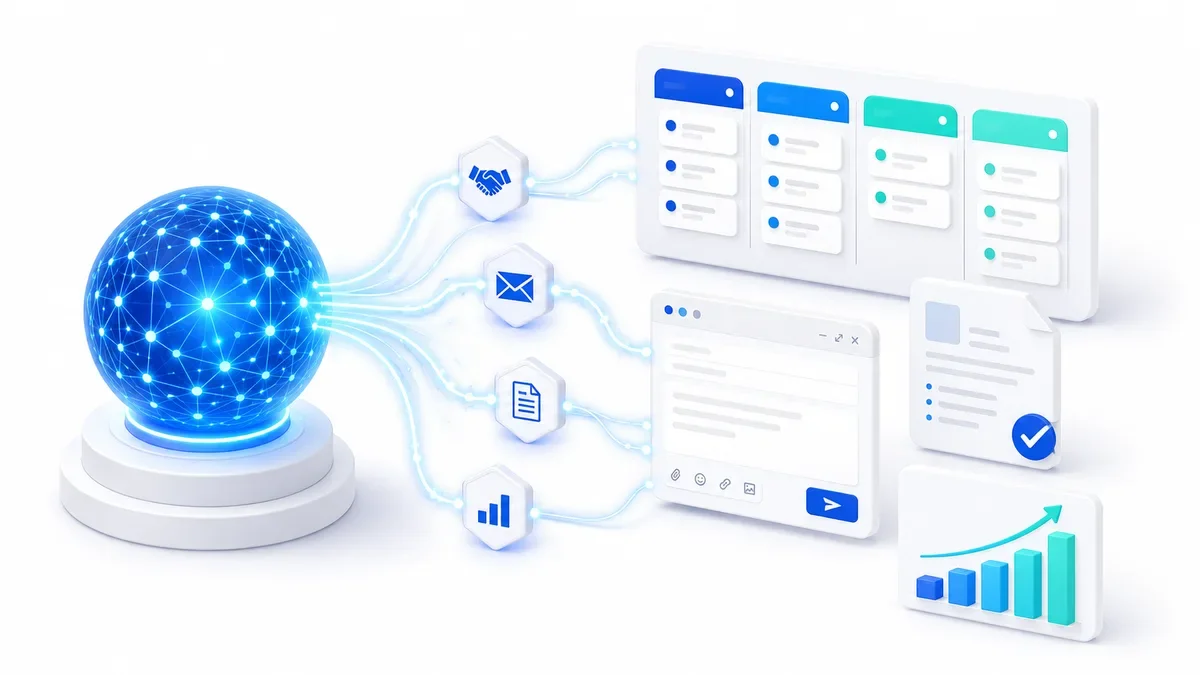
This diagram summarizes the whole article:
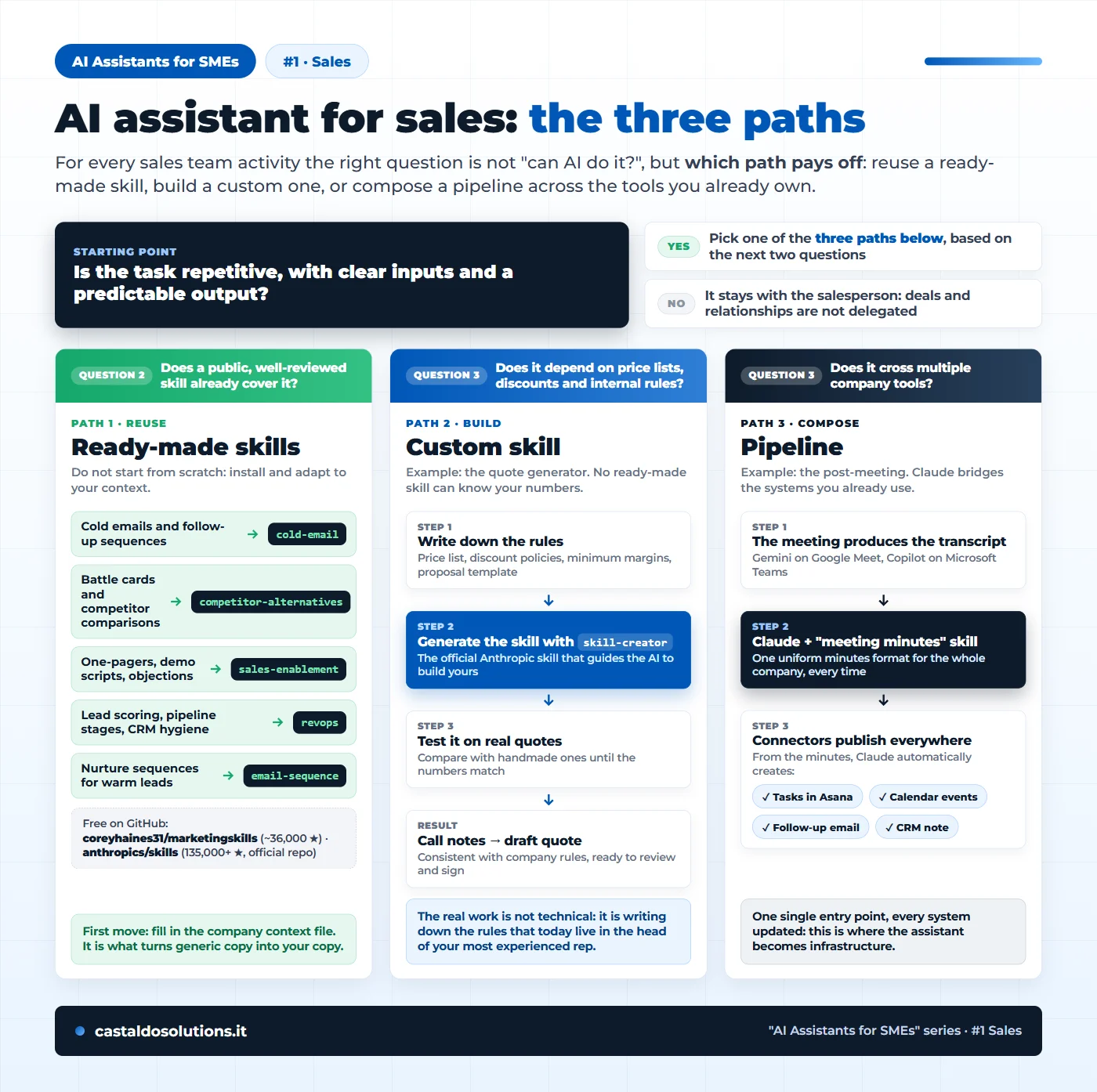
Let's go through them one by one.
Path 1: ready-made skills, activity by activity
Do not start from scratch. The marketingskills collection by Corey Haines (around 36,000 stars on GitHub, the most used for marketing and sales, compatible with Claude Code and the other major AI agents) contains skills that alone cover half of the non-selling work. Here is the map:
- You need cold emails and follow-up sequences → skill
cold-email: subject lines, openers, body copy and multi-touch follow-ups, personalized to the prospect's industry. - You need to answer "why you and not competitor X?" → skill
competitor-alternatives: up-to-date battle cards and comparisons, with objection handling. - You need one-pagers, demo scripts and objection documents → skill
sales-enablement: the sales collateral reps actually use. - You need order in lead scoring, pipeline stages and CRM data → skill
revops: the processes connecting marketing and sales. - You need to warm up lukewarm leads over time → skill
email-sequence: automated nurture sequences.
Alongside this collection, keep an eye on Anthropic's official repository (over 135,000 stars, we come back to it for path 2) and the curated directory awesome-claude-skills to explore further.
One detail of Corey Haines' collection deserves attention, because it answers the most common objection ("AI writes generic stuff"): every skill in the suite, before producing any text, looks for a company context file with your positioning, differentiators and tone of voice. Filling it in is the first job to do, and on its own it changes the quality of everything that comes after.
Path 2: the custom skill. The quote generator case
There is one request we hear from every sales team: "I want the AI to prepare my quotes". And it is precisely the case where a ready-made skill does not exist, and cannot exist.
The reason is simple: price lists, discount policies, minimum margins, approval rules and proposal formats are different in every company. A generic quote generator would produce wrong numbers, which in sales is worse than having nothing. The path is a four-step process:
- Write down the rules: price list, discount policies, minimum margins, proposal template. It is the step nobody wants to do and the one worth the most: those rules today live in the head of your most experienced rep.
- Generate the skill with
skill-creator, the official skill from the Anthropic repository that guides the AI itself through building yours. We documented the full process in our guide on how to create a skill for Claude Code. - Test it on real quotes: compare the output with handmade quotes until the numbers match.
- Hand it to the team: the salesperson pastes in the call notes and gets a draft quote consistent with company rules, ready to review and sign.
The same pattern applies to every activity that touches your numbers: product configurations, commission calculations, contract terms.
Path 3: the post-meeting pipeline, from one transcript to all your systems
The third path is the most powerful and the one almost nobody talks about: here the value is not in a single skill but in a chain of tools you already own, with the AI acting as the bridge.
Take the post-meeting, the work every salesperson postpones to the end of the day:
- The meeting produces the transcript on its own. It does not matter which platform you use: Gemini generates it on Google Meet, Copilot generates it on Microsoft Teams. Today that text dies in a folder.
- The transcript goes into Claude, which turns it into meeting minutes. And here is a piece of advice we give to companies that want to do this properly: if you need a uniform minutes format for the whole company (same sections, same conventions for decisions and action items, no matter who attended), codify it in a small "meeting minutes" skill. Some companies already do this, and the difference shows when the minutes of ten different reps become readable in the same way.
- From the minutes, connectors publish everywhere. Claude connects directly to your business tools through its connectors: from the same minutes it can create tasks in Asana with owners and due dates, schedule follow-up meetings in your calendar, draft the follow-up email in your company tone and generate the update note for the CRM (to connect that too, our guide on connecting Claude to your CRM with an MCP server closes the loop).
The strategic point is the last one: the assistant becomes the single entry point where the salesperson pours in what happened, and every company system gets updated from there. No more "I'll log it in Asana later, then update the CRM, then send the email": one set of minutes, everything published.
Two recommendations we always give: when you connect AI to company systems, start read-only where possible, and remember that transcripts contain real customer data, so the rules on what never to upload to an AI apply.
Where to start: three steps for your sales team
If I had to start tomorrow in an SME, I would do this, in this order:
- Write the company context. One document covering what you sell, to whom, against whom and in what tone. Without this, every AI output will be generic.
- Start with path 1: install one ready-made skill and have a single salesperson use it for two weeks. The
cold-emailskill or the battle card are the ideal starting points: visible results, zero risk on your data. - Measure the time saved, then tackle paths 2 and 3. If the pilot works, the quote generator is almost always the first custom project that pays back the effort, and the post-meeting pipeline is the first step toward the assistant as infrastructure.
The fastest way to understand which assistants your team needs (not just in sales) is our free AI Team Builder: answer a few questions about your department and get the recommended team of AI assistants for your company. And if the pilot works but you do not have the time or the skills to build the custom skill or the pipeline yourself, our AI consulting for SMEs walks you through it step by step. And if CRM is the hot topic for you, our guide on how to choose a CRM for an SME is the natural companion to this article.
This is the first article in the AI Assistants for SMEs series: in the next ones we will look at what changes for marketing and for administration.
Tags

Founder & CEO · Castaldo Solutions
Sono un consulente di trasformazione digitale con esperienza enterprise. Aiuto le PMI italiane ad adottare AI, CRM e architetture IT con risultati misurabili in 90 giorni.