Business Process Mapping with AI: process-builder, Our Open-Source Skill
We open-sourced the method we use to map our clients' processes: process-builder is an AI skill that interviews you (who does what, when, with which tool) and generates a professional BPMN swimlane in draw.io, with pain points highlighted and an automation roadmap.
In short
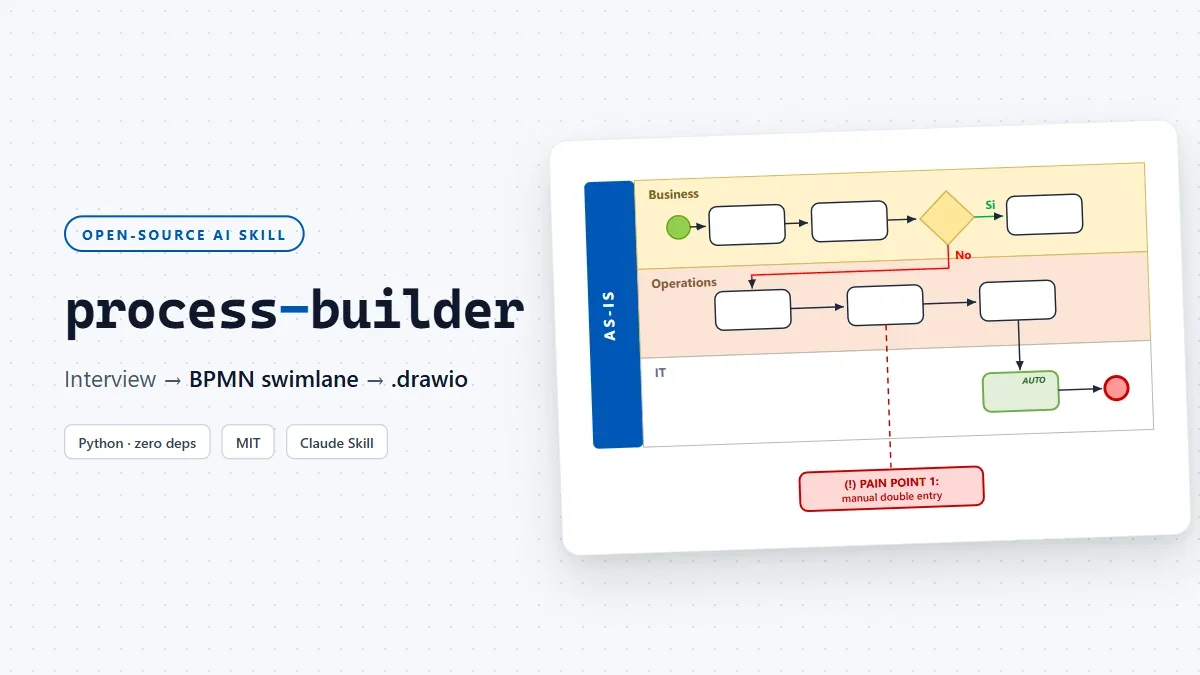
process-builder is an open-source AI skill (MIT license) that turns a conversation about your business process into a professional BPMN swimlane, delivered as an editable draw.io file. It doesn't start from a template: it interviews you (who does what, in which order, with which tool, where time gets lost) and only draws once the picture is complete. It produces the AS-IS with pain points highlighted exactly where they hurt and, if you want, the TO-BE in two variants: Quick Win (2-4 weeks) and Full Automation. It's the method we use in our consulting engagements, and starting today it belongs to everyone: github.com/Castaldo-Solutions/process-builder.
What is business process mapping?
Business process mapping is the practice of documenting in a diagram who does what, in which order, with which tools and with which decisions in between, so that how the company actually works becomes visible. The most effective format is the swimlane diagram: each actor gets a dedicated lane and activities read left to right, making handoffs between people and departments (where processes usually break down) obvious at a glance.
It's the mandatory starting point of any automation project: before changing a process, you need to know what it looks like today.
Why we open-sourced our method
Every serious automation project starts with the same question: how do you actually work today? Not what the org chart says, not what's written in the 2019 quality procedures, but what really happens: WhatsApp messages to technicians, paper delivery notes getting lost between site and office, and that "temporary" Excel file that's been around for three years.
Process mapping is the first deliverable of almost every assessment we run. And over the years we learned something counterintuitive: the bottleneck is never the drawing, it's extracting the information. Anyone can put rectangles and arrows on a whiteboard; very few people ask the right questions in the right order and resist the temptation to fill the gaps with plausible assumptions.
So we codified the method (the interview, the diagram quality rules, the notation) into a Claude skill and used it internally. Now we're giving it to the community, because the more companies map their processes well, the better for the whole ecosystem: an automation built on a process nobody ever mapped is just an elegant way to do the wrong thing faster.
This isn't a theoretical risk: according to McKinsey's global survey "Unlocking success in digital transformations" (2018), fewer than 30% of business transformations meet their goals, and among digital ones only 16% improve performance in a sustainable way. The factors that separate successes from failures (leadership, capabilities, redesigned roles, communication) are about processes and people, not technology. Starting from the map is the cheapest way to end up on the right side of those numbers.
What process-builder does
AS-IS mode: the snapshot
The skill runs a structured interview, one question per turn, and generates the swimlane of your current process:
- One lane per actor (never two actors in the same lane)
- BPMN gateways for decisions, with Yes/No exits routed on different sides of the diamond so arrows never overlap
- Tools annotated under each task (email, Excel, ERP, WhatsApp, paper...)
- Pain points outside the flow, in red, connected with a dashed line to the exact step that causes them
- Separate phases only when justified: a clear change of actors, tools or purpose, not "because the process is long"
TO-BE mode: the roadmap
Starting from the confirmed AS-IS, the skill proposes the optimized process in two versions: Quick Win (light automations, achievable in 2-4 weeks with the tools you already have) and Full Automation (the target scenario, with deep integrations). Automated tasks are green, new ones are blue, and solved pain points disappear: they've been solved.
The rule that makes the difference
The skill has one hard rule, which we call RULE ZERO: it generates nothing until it knows four things. Who does what, when and in which order, with which tool, and which decisions exist along with their conditions. If even one piece is missing, it asks questions. It never invents plausible-looking actors, tools or steps: a plausible-but-invented diagram is worse than one more question.
It's the difference between a tool that draws and a method that understands. The drawing is the output; the value is in the interview.
How it works under the hood
The flow has three steps, and the third is deliberately boring:
- Interview: the AI gathers actors, flow, tools, decisions and pain points, then presents a structured summary and waits for your explicit confirmation.
- JSON: the confirmed process becomes a small declarative JSON file (about thirty lines for a typical process).
- Generation: a Python script (zero dependencies, Python ≥ 3.9) validates the JSON and produces the
.drawiofile: deterministic column layout, pain points distributed without overlaps, collision-free arrow routing.
The important architectural point: the AI never writes draw.io XML by hand. It writes the JSON, the script does the rest. If the JSON has errors (duplicate ids, orphan connections, unknown actors), the script reports them with messages that explain where the problem is and how to fix it; the AI fixes the JSON, not the XML. It's the same pattern we describe in how Claude Skills work: intelligence in the orchestration, determinism in the execution.
How to try process-builder in 5 minutes
The easiest way is to ask Claude directly. Open Claude Code and type:
Install the process-builder skill from
https://github.com/Castaldo-Solutions/process-builder
and explain how to use it
Claude downloads the repository into the skills folder, reads the documentation and sets itself up. From that moment on, a single sentence like "let's map our order-management process: draw the AS-IS" starts the interview. Alternatively, grab the ready-made .skill package from the latest release.
Just want to see the output, without the AI? The script also works on its own:
git clone https://github.com/Castaldo-Solutions/process-builder
cd process-builder
python scripts/generate_swimlane.py examples/richiesta_ferie_as_is.json leave.drawio
Open leave.drawio on app.diagrams.net and you get a complete swimlane with gateways, pain points and legend. If skills are new territory for you, we have a guide to creating and installing them.
draw.io vs Visio vs Mermaid: why we chose draw.io
The output needed a format that's free, editable and version-controllable. The comparison we ran before choosing:
| Criterion | draw.io | Microsoft Visio | Mermaid |
|---|---|---|---|
| Cost | Free | Microsoft 365 license | Free |
| Runs on | Browser, no account needed | Microsoft desktop/web | Anywhere Markdown renders |
| File format | Plain-text XML, Git-versionable | Proprietary (.vsdx) | Text |
| Multi-actor swimlanes | Full support | Full support | Limited |
| Pain points outside the flow | Yes (free-floating shapes) | Yes | No |
| Editing after generation | Free-form, drag & drop | Free-form | Only by rewriting the code |
Mermaid remains great for simple diagrams inside documentation; Visio is the enterprise standard but costs money and ties you to the Microsoft ecosystem. draw.io is the only one of the three that combines zero cost, full visual editing and a text format you can keep in Git next to your code.
What it does NOT do (honestly)
- It's not a BPM engine: it draws and documents processes, it doesn't execute them. For execution you need real automation tools, which we cover in AI automation for SMEs.
- It doesn't replace judgment: the skill applies a method, but deciding which process to map first and which pain points to attack remains a business decision.
- The content is in Italian: interview guides and prompts were built for Italian-speaking teams (that's our real use case). The JSON schema and the generator are language-agnostic, though, and an English translation is on the roadmap.
Frequently asked questions
What is a swimlane diagram? It's a flowchart in which every actor in the process (a person, department or system) gets a dedicated lane, and activities read in sequence from left to right. It makes handoffs of responsibility between actors, waiting times and bottlenecks immediately visible.
Do I need to know how to code? No. The AI handles the interview, the JSON and the script. You only need Python installed (≥ 3.9, no libraries to install).
Does it only work with Claude? The skill follows Anthropic's Agent Skills specification (Claude Code, Claude.ai). The generator script is independent, though: anything that produces JSON matching the documented schema gets a diagram.
Is the .drawio file editable? Fully. It's standard diagrams.net XML: open it, move things, recolor and re-export as you like. No lock-in.
Why draw.io and not Visio or Mermaid? draw.io is free, runs in the browser without an account, and the format is Git-versionable text. Mermaid is great for simple diagrams but doesn't handle multi-actor swimlanes with pain points placed outside the flow.
Can I use it for non-business processes? Yes: anywhere multiple actors hand work to each other with decisions in between. Onboarding, paperwork, customer support, even household processes if you like.
The step after the map
A well-made AS-IS map is valuable on its own: it gets everyone to agree on how work actually happens, often for the first time. But the real value comes next, when pain points become priorities and priorities become a plan.
That's exactly what we do with our CompanyTech BattlePlan assessment: it starts with a free pre-assessment, maps the critical processes and ends with an automation roadmap and estimated ROI. process-builder is the first tool in that toolbox. And now it's yours too.
If you try it and find it useful, a star on GitHub helps us spread the word. And if you want help turning the map into automations that work, let's talk.
Tags

Founder & CEO · Castaldo Solutions
Sono un consulente di trasformazione digitale con esperienza enterprise. Aiuto le PMI italiane ad adottare AI, CRM e architetture IT con risultati misurabili in 90 giorni.