How Claude's memory works for chats and agents (and the cost of remembering too much)
Claude Code remembers in two ways: the instructions you write in CLAUDE.md files and the auto memory it writes on its own, one per repository. Everything it loads at startup is paid for in every session, and in our website project memory was the heaviest item. How it works, how to share it across projects, the options from the simplest to a company brain, and how we cut it in half, with before and after tests.


Claude Code's memory has two parts: the instructions you write in CLAUDE.md files and the notes Claude writes on its own in auto memory, one folder per repository. At startup it loads the CLAUDE.md files in full plus the memory index, and reads the rest only when needed. Everything it loads, you pay for in every session.
In practice: keep what always loads short, move the details to places that open only when needed, and before adding an external memory, clean up the one you already have.
I say this with numbers. On one of my PCs a Claude Code session starts, at the median, with 78,496 tokens before the first message is even sent, and in our website project the heaviest item in that count was memory: 29.4k tokens, more than half of them in a single file. In this article I explain how Claude's memory works for chats and agents, what it costs, and the options for boosting it, from the most practical to the most complex. Then I show how we cut it in half, with the tests we ran before and after.
How does Claude Code's memory work?
Every Claude Code session starts with an empty context: the model doesn't remember yesterday's conversation. Two mechanisms carry knowledge from one session to the next, and Anthropic's documentation separates them like this:
| CLAUDE.md | Auto memory | |
|---|---|---|
| Who writes it | You | Claude |
| What it contains | Instructions and rules | Corrections, preferences, facts the code doesn't tell |
| Where it lives | In the project and in ~/.claude/ |
In ~/.claude/projects/<project>/memory/ |
| What loads at startup | Every file, in full | The first 200 lines or 25KB of the MEMORY.md index |
CLAUDE.md: the instructions you write
CLAUDE.md is the file where you write down what you would otherwise repeat in every chat: commands, conventions, files not to touch. Claude Code looks for it at several levels: the organization file managed by IT, your personal one in ~/.claude/CLAUDE.md, the project one in ./CLAUDE.md or ./.claude/CLAUDE.md, plus a CLAUDE.local.md for notes that don't go into git. It loads the ones in the folder where you launch it and in every folder above; it reads subdirectory CLAUDE.md files only when it works inside them. How to write a good one is in my CLAUDE.md guide.
Two details matter for the cost. Rules in .claude/rules/ with a paths field load only when Claude opens a file they cover. @path imports, on the other hand, help you organize a long file, but according to the documentation they "don't reduce its context cost": the imported file loads together with the one that imports it.
Auto memory: the notes Claude writes
Auto memory is the persistent memory Claude fills in on its own while you work: your corrections, your preferences, project facts that can't be derived from the code. Each note is a markdown file with a type (user, feedback, project or reference), and an index, MEMORY.md, keeps one line per note. At startup Claude loads only the index, up to 200 lines or 25KB, and opens notes when it needs them. The documentation adds a useful detail: Claude doesn't save what it can derive from the code, nor "anything your CLAUDE.md files already say".
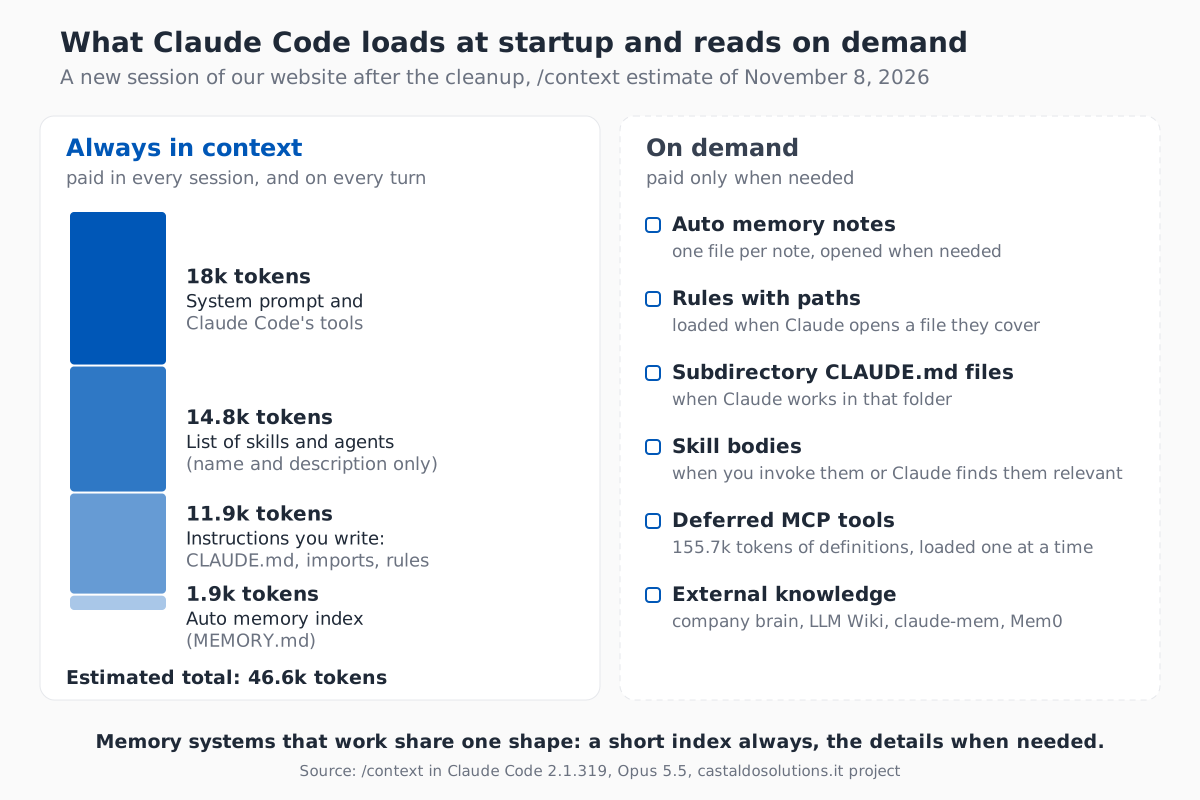
The rule applies to everything: what sits on the left is paid for in every session, what sits on the right only when needed. MCP tools are the clearest example: in our case their definitions are worth 155.7k tokens, but Claude Code loads them one at a time, when needed.
Does Claude remember things from one project to another?
No, and that's by design. Auto memory lives in ~/.claude/projects/<project>/memory/, and the git repository decides what the project is: according to the documentation "all worktrees and subdirectories within the same repo share one auto memory directory", and outside git the folder is used. I had always thought Claude segmented memory by working folder: that's almost true, it segments it by repository.
This has two practical consequences. First, what Claude learns in one project is invisible in the others. Second, memory doesn't travel, because it's "machine-local". I use Claude Code on more than one PC, and what it learns on one isn't there on the other.
We noticed it with a concrete case. The folder of a training course for a client was moved inside another repository. From then on, sessions in the new repository used its memory, which was empty, while the two notes about the course (schedule, trainers, teaching choices) sat in two orphaned, identical folders, where no session would ever read them again.
In claude.ai and Cowork the principle is the same: memory is separate per project. Anthropic says so in its memory announcement, "Claude creates a separate memory for each project", and in the article on context rot I explain why every procedure deserves its own folder.
How do you share memory across different projects?
When something applies everywhere, it has to move out of the single project. The options, from the simplest:
- The user CLAUDE.md,
~/.claude/CLAUDE.md: it applies to every project, but only on that PC. - User rules in
~/.claude/rules/: they load in every project. If the folder is a link to a git repository, the same rules reach every PC with agit pull. In Cowork, though, rules linked to an outside folder don't load. - An import of a shared file, with
@path/file.md: this is how our user CLAUDE.md loads the CORE of our company brain in every session. - Additional directories: with
--add-dirClaude also works in another folder, and with theCLAUDE_CODE_ADDITIONAL_DIRECTORIES_CLAUDE_MD=1variable it loads that folder's CLAUDE.md files too. - A shared auto memory: the
autoMemoryDirectorysetting moves the memory folder, so several repositories of the same client can write to the same one. - Subagent memory: the
memoryfield in an agent definition, with theuser,projectorlocalscope, gives the agent its own memory, which withuserapplies across all projects. I cover subagents and how much they consume in the article on Claude Code subagents.
The opposite risk is a lesson that applies everywhere saved in the wrong place. In the audit of November 8, 2026, across the 367 memory notes on my PC, "always commit and push" was saved in seven different projects, and the rule on which model to use for subagents in nine, in three versions that contradicted each other. Every session applied the version of the project it ran in. We moved them into a single user rule: 824 tokens, loaded everywhere.
How much does Claude's memory cost in tokens?
I measured the 234 Claude Code sessions of the last 90 days on one of my PCs, from the local transcripts, which record the tokens of every request: the first turn starts at a median of 78,496 tokens, before the first message is even written. In the website project the median is 85k, and the session of November 8 started at 91k.
One command shows what that count is made of: /context all. In a new session of the website project, before the cleanup, it estimated 62.6k tokens: 18k of system prompt and tools, MCP included, 14.8k of skills and agents lists, 29.4k of memory files and the rest in session messages. Of those, 17.9k were a single file, tech.md, the site's technical instructions: 595 lines loaded in every session, including the ones where we were writing an article and not touching the code.
Other projects repeat the picture, and it shows where the problem is. Across eight projects measured with /context, the project CLAUDE.md ranges from 27 tokens to 51,300 in a client project, while the auto memory index never goes above 3,400, because it is capped at 200 lines. The memory that weighs the most isn't the one Claude writes: it's the one we write and never prune.
You pay the price in two ways:
- In tokens, in every session. The starting context is written to the cache on the first request and read again on every turn. For a one-line question, a new session of the website project cost $0.47 at API prices according to Claude Code's own estimate, almost all of it to write those tokens to the cache. On a subscription you don't pay in dollars, but you use up your usage limits.
- In attention. Anthropic says so in its documentation: files over 200 lines "consume more context and reduce adherence". The IFScale study by Distyl AI, from July 2025, measures it on the models of the time: Claude Opus 4 follows 100% of 50 instructions given together, 94.6% of 100 and 44.6% of 500, and even the best models stop at 68% at 500 instructions.
Simple or boosted memory: what are the options?
The options, from the most practical to the most complex:
| Option | Where it lives | What loads | When it fits |
|---|---|---|---|
| Chat memory (claude.ai, Cowork) | In your account, per project | Claude manages it | You work in the app and don't want to write files |
| CLAUDE.md | In the project | All of it, every session | Rules that always apply |
| Auto memory | ~/.claude/projects/ |
The index, notes on demand | Corrections and preferences, with no effort |
Rules with paths and skills |
.claude/rules/, .claude/skills/ |
Only when needed | Details and long procedures |
| Karpathy's LLM Wiki | An Obsidian vault | The index, then the pages | A knowledge base on one topic, compiled from sources |
| External tools (claude-mem, Mem0) | Databases and vectors | Whatever hooks or MCP inject | Capturing automatically what the agent does |
| Company brain | A git repository | One file always, the rest on demand | A company's knowledge, shared across projects and agents |
What is Karpathy's LLM Wiki?
The LLM Wiki is a method Andrej Karpathy described in April 2026 in a gist: instead of searching the documents at every question, as a RAG does, the agent compiles the sources into linked markdown pages and keeps them up to date. It has three layers (the raw sources, which are never touched; the wiki, which the agent writes; a schema, which for Claude Code is a CLAUDE.md) and three operations: ingest, query and lint.
Karpathy puts the difference this way: in a RAG "the LLM is rediscovering knowledge from scratch on every question", in the wiki "The knowledge is compiled once and then kept current". Obsidian is the viewer: "Obsidian is the IDE; the LLM is the programmer; the wiki is the codebase". According to him the method holds up "at moderate scale (~100 sources, ~hundreds of pages)".
In May 2026 I built one on Castaldo Solutions' materials, with two skills, one to compile and one to lint: 39 sources became 61 pages and 695 links. The most useful thing it did on its own: it found the contradictions in our materials, like the registered office written as Milan in one document and Pavia in another, or the pillars that were three on one page and four on another. It was an experiment: in the end I chose the company brain structure, which is more complex, but I needed to understand how the mechanisms work, and it was worth it.
External tools: claude-mem, Mem0 and the others
Outside Claude Code there is a whole market of agent memories. The one with the most GitHub stars is claude-mem, 114,818 as of November 8, 2026: a plugin that uses hooks to observe what the agent does during a session, compresses it and puts it back into context in later sessions. Mem0, 68,640 stars, is a memory layer with semantic search that any agent can use; Basic Memory keeps memory in markdown files the agent queries via MCP.
They all make the same bet: capture more, automatically. That makes sense when the agent has no memory of its own. Claude Code already has auto memory, and the risk becomes the opposite one: remembering too much. Our company brain took the ideas that work from these tools, without adding a database.
The company brain: a company's memory
The company brain is our company memory: a git repository of markdown files that every project and every agent reads. It is the most complex option, and it is made of the same pieces as the others:
- a short index always, the details on demand, like
MEMORY.mdand the index of Karpathy's wiki: a single file, the CORE, is always in context, and a map says which other file to open and when; - the wiki's lint: at every commit three checks verify the style, the numbers that must not diverge between files and the consistency of the map;
- fact expiry: every file has a verification date, and at the start of every session a hook lists the expired ones, to be treated as hypotheses;
- automatic capture, like claude-mem's hooks: at the end of a session a hook collects the sentences I used to correct the agent and sends them to our PM agent, which the next morning suggests where to write them down.
How does a Claude agent's memory work with the API?
If you develop your own agent with Anthropic's API, there are two memory tools. The memory tool gives Claude a folder of files to read and write, which lives in your application: "Claude requests file operations, and your application runs them". In Managed Agents, still in beta, memory is a store of documents mounted in the agent's sandbox, and the documentation gives advice that applies to any memory: "Structure memory as many small focused files, not a few large ones."
How did we cut our startup memory in half?
On November 8, 2026 we applied the method to ourselves, in the website project, with three changes:
tech.mdsplit up. The long sections (blog, CSS, performance, lead attribution, navbar, structured data, server) became seven rules withpaths, which load when Claude opens the files they serve. The always-loaded file kept 102 of its 595 lines, plus a map of the rules.- Auto memory cleaned up. In the website project we removed 13 notes that repeated the CORE, a rule or a brain file, and rewrote 4: the index went from 42 to 29 entries, each under 150 characters. In the other projects we removed 18 pure duplicates, and the orphaned course notes went back to where sessions read them.
- Shared lessons in one place: the user rule I mentioned above.
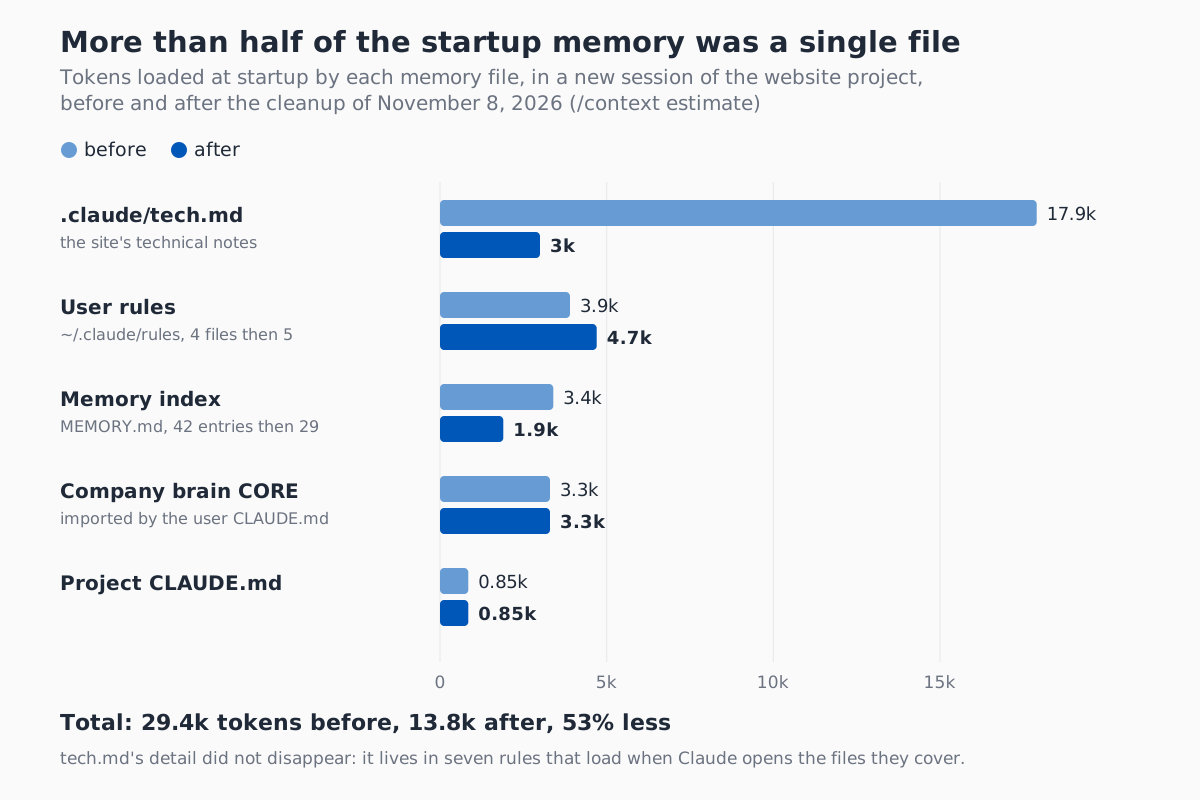
| Measure, website project | Before | After |
|---|---|---|
Memory files at startup, /context estimate |
29.4k tokens | 13.8k tokens |
Always-loaded tech.md |
595 lines, 17.9k tokens | 102 lines, 3k tokens |
| Real first turn of a new session | 85,013 tokens | 69,670 tokens |
The real first turn, measured after splitting tech.md and before cleaning up the index, went down by 18%: the memory files were cut in half, the rest of the starting context wasn't.
Then the test that matters: quality. I asked a new session, before and after, the same question: what is the exact command to clear the blog cache in production? The answer sits in one of the moved rules, and it changed with version 2 of the CMS. Before, Claude answered correctly because it had all of tech.md in context. After, it answered correctly in both ways I tested it: with no help, it read the map and opened the blog rule on its own; after opening an article, the rule reached its context by itself.
We learned one thing along the way: not every duplicate should go. A note that repeats a brain file stays if that file opens only on demand and the note prevents a mistake. The ban on piping a command on the server, for example, lives in the brain, but the note in the website's memory stays: Claude runs those commands even when nobody mentions the server.
How do you make Claude's memory efficient? Six steps
- Measure. In a new session run
/context alland read the "Memory files" entry, file by file. If you run it from a terminal withclaude -p "/context all"on Windows with Git Bash, addMSYS_NO_PATHCONV=1, otherwise the leading slash becomes a path. - Shorten what always loads. Every CLAUDE.md under 200 lines; details that matter only to part of the code in
.claude/rules/withpaths; long procedures in a skill; in the main file a map with one line per rule, so Claude knows what to open. - Clean up auto memory with the four phases Anthropic uses, described in the next section: look at what's there, find outdated facts, merge duplicates and keep the index at one line per note.
- Promote the lessons that apply everywhere into a user rule in
~/.claude/rules/, and remove the copies from individual projects. - Check where memory points when you move a folder or a repository: the notes stay where they were, and the new session starts empty.
- Test before and after. Run
/context allagain and ask a new session a question whose answer you moved: it must still answer correctly.
There are ready-made tools to keep it that way. /memory opens the memory folder and lets you turn auto memory off or on. /doctor prompt-audit, which according to the documentation requires Claude Code 2.1.283 or later, looks for outdated or conflicting instructions in your files. The official claude-md-management plugin updates your CLAUDE.md with what you learned during the session. And if an instruction must always apply, with no exceptions, it isn't memory: it's a hook.
Does Claude Code consolidate its memory on its own?
Not yet, at least not in a documented way. The code of Claude Code 2.1.319, the version installed on my PC on November 8, 2026, already contains a setting, autoDreamEnabled, described as "Enable background memory consolidation (auto-dream)". There it runs after at least 24 hours and 5 sessions since the last consolidation, but the documentation doesn't mention it, and it isn't active for us yet.
The prompt it uses can be read in the program, titled "Dream: Memory Consolidation", and it works in four phases: orient on what is already in memory; gather recent signal, meaning facts the code has contradicted and a few targeted searches in the transcripts; consolidate, merging instead of duplicating, turning relative dates into absolute ones and fixing contradicted facts at the source; prune the index, with one line under 150 characters per note. Until it reaches everyone, you do it by hand: that's what we did.
Frequently asked questions
Where does Claude Code store its memory?
Auto memory lives in ~/.claude/projects/<project>/memory/, one folder per git repository: subdirectories and worktrees of the same repository share it. Inside there is the MEMORY.md index, whose first 200 lines or 25KB Claude loads at startup, and one file per note, read when needed. The instructions you write live in CLAUDE.md files instead, in the project and in ~/.claude/CLAUDE.md, and they load in full.
How do you turn off Claude Code's auto memory?
From the /memory command, with the auto memory toggle, which saves autoMemoryEnabled in your user settings. For a single project, set "autoMemoryEnabled": false in that project's settings, and with an environment variable use CLAUDE_CODE_DISABLE_AUTO_MEMORY=1. CLAUDE.md files stay active: you only switch off the notes Claude writes on its own.
Does Claude Code's memory sync across computers?
No. Anthropic's documentation calls it "machine-local": notes don't move from one computer to another, nor to cloud environments. To have the same rules on several PCs, keep them in a git repository and link them in ~/.claude/rules/, or import them in your user CLAUDE.md. That's what we do with the company brain CORE and the shared rules.
If you want to start with one thing, start by measuring: open a new session in the project you use most and run /context all. If the biggest item is a file you wrote, you already know where to begin.