Context rot: why Claude gets worse in long chats (and why you should stop attaching files)
Context rot is the drop in Claude's precision as the context fills up. Four charts and 231 measured work sessions: why lighter models give way first, why attaching files makes answers worse, when to start a new chat, and how to organize projects and memory.


Context rot is the drop in an AI model's precision as its context fills up: the more text it has in front of it, the worse it finds and uses the right information. Anthropic says so in Claude's documentation. It starts long before the window limit, grows with long chats and heavy attachments, and a new chat resets it.
In practice: start a new chat when you switch tasks, after two corrections that don't fix it, or when compaction kicks in, and give files by their path instead of attaching them.
In the field I see it in two situations, always the same ones. The first is the long conversation: the further you go, the more errors pile up, sometimes with serious hallucinations, and the closer you get to the maximum context, the more they come. The lighter the model, the sooner it happens. The second is the attachment: an Excel file or a PDF uploaded to the chat becomes tokens, takes up context and, as the conversation grows, the model loses pieces of it. In this article I put both against the numbers, with four charts and a measurement taken on my own work sessions.
What is context rot, and why does Claude get worse in a long chat?
The name comes from studies that hide one piece of information inside a long text and ask the model to find it. Anthropic defines it on its context windows page: more context isn't automatically better, because "as token count grows, accuracy and recall degrade, a phenomenon known as context rot". In its article on context engineering from September 29, 2025, it adds the most useful image for understanding it: models have an "attention budget", and every new token spends some of it.
In a chat the mechanism is simple. With every message the model rereads the whole conversation: according to the same documentation, the input contains "all previous conversation history plus the current user message". Every discarded draft, every failed attempt and every correction stays there and gets reread each time.
And none of that is neutral noise. Chroma's July 14, 2025 study of 18 models, which I also cover in the article on the skills I use every day, measured that a single distractor, meaning information similar to the right one but wrong, is enough to lower performance. In a long chat the distractors are your earlier versions. Some hallucinations that look inexplicable can come from there: an old version, still in context, that resembles the right one.
Does context rot still happen with newer models?
Yes, but much less than two years ago, and the difference matters for deciding what to do.
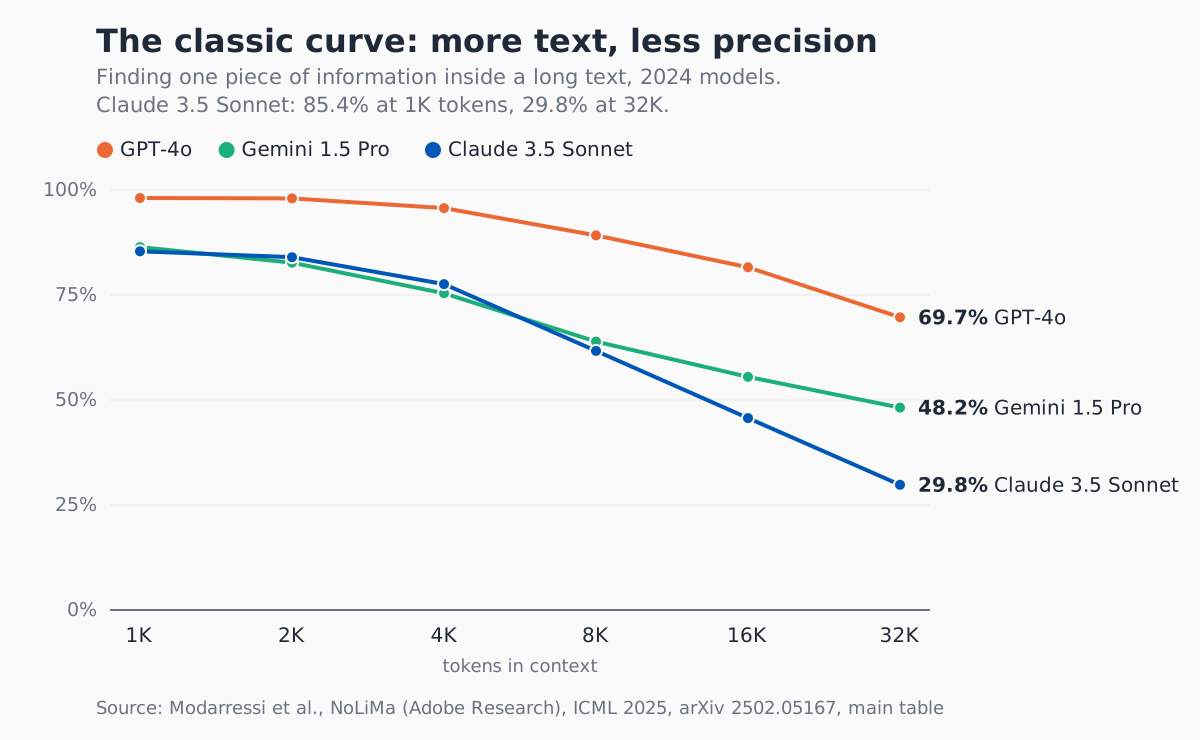
The curve that made the problem famous comes from NoLiMa, the Adobe Research study presented at ICML 2025: at 32K tokens, 11 models out of 13 dropped to half of their short-text score or less. Claude 3.5 Sonnet, for example, goes from 85.4% at 1K tokens to 29.8% at 32K.
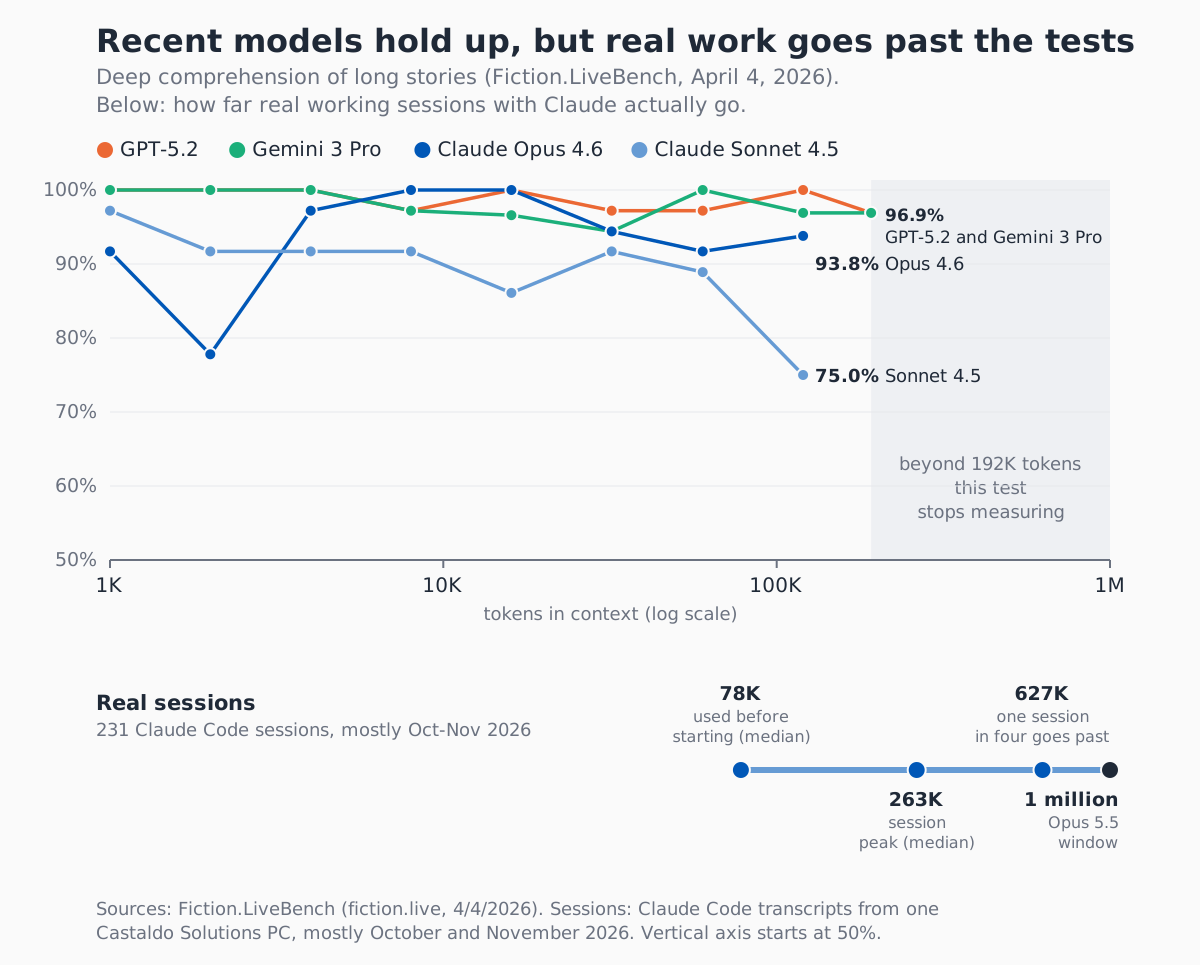
Those models, though, are from 2024. On Fiction.LiveBench, a deep comprehension test on long stories updated on April 4, 2026, recent models hold up much better: Claude Opus 4.6 scores 93.8% at 120K tokens, GPT-5.2 and Gemini 3 Pro stay above 96%. The sample is small and the values move up and down in steps, but the signal is clear: up to 120K tokens, top-tier models no longer collapse.
The point is where the tests stop. I measured the 231 Claude Code sessions recorded on one of my PCs over the last three months, almost all from October and November 2026 and almost all with Opus 5.5:
- before the first message is even written, 78K tokens of context are already taken (median): instructions, rules, memory, tools;
- half of the sessions go past 263K tokens, one in four past 627K;
- 31 sessions out of 231 reached automatic compaction.
The measurement comes from Claude Code's local transcripts, which record for every response how many input tokens the model had. It is one PC and one user: it describes how I work, not an average.
So real work happens exactly in the zone the public curves don't reach. For Opus 5.5 Anthropic doesn't publish a curve by length: its system card from September 22, 2026 measures long context with ProgramBench, a programming task that goes up to one million tokens, where Opus 5.5 scores 91.2%. The most recent direct comparison at one million tokens I found comes from the Opus 4.6 launch on February 5, 2026, on the MRCR v2 test: 76% for Opus 4.6, 18.5% for Sonnet 4.5. Even the flagship of that launch gets one case in four wrong at that length.
Those 78K starting tokens are largely my company brain: company rules, project instructions and memory that Claude loads in every session. Permanent instructions take up context too. That is why Anthropic recommends keeping each CLAUDE.md under 200 lines: whatever Claude always reads has to be short.
Do lighter models give way first?
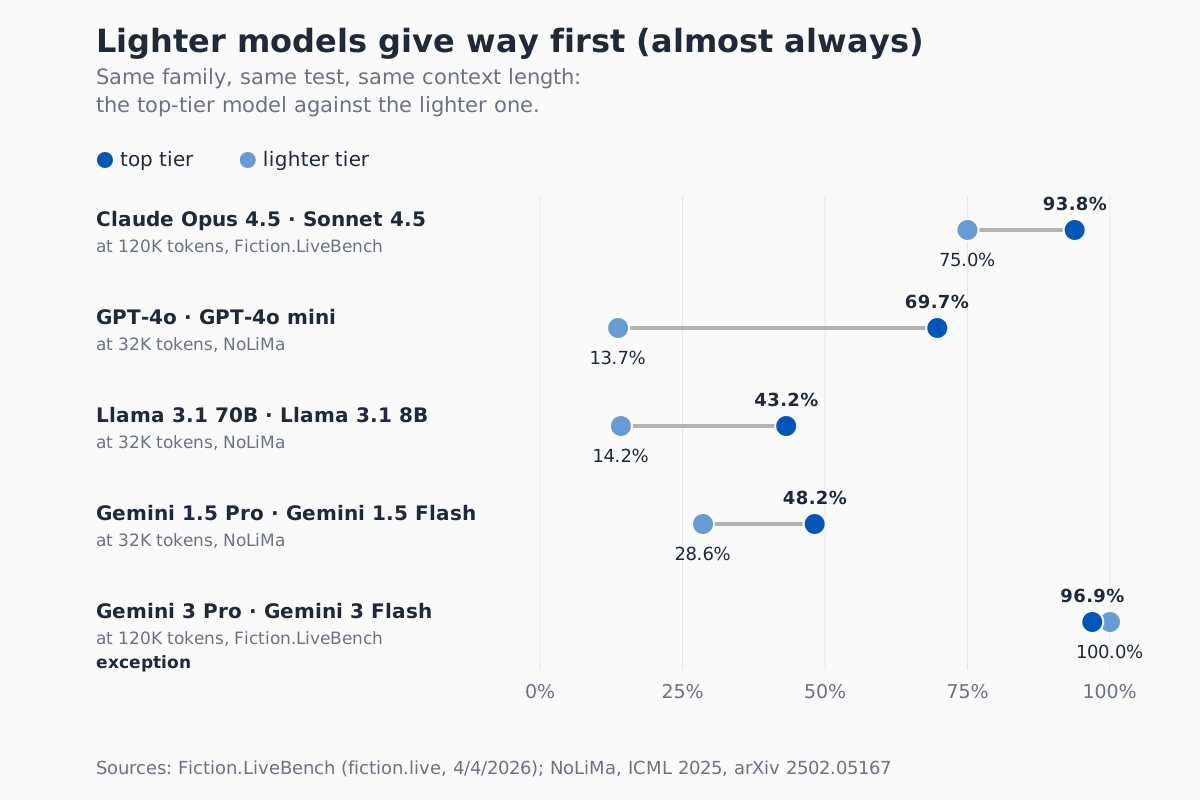
Almost always. The comparison that holds is inside the same family, with the same test and the same length.
| Pair | Test and length | Top tier | Lighter tier |
|---|---|---|---|
| Claude Opus 4.5 and Sonnet 4.5 | Fiction.LiveBench, 120K tokens, April 2026 | 93.8% | 75.0% |
| GPT-4o and GPT-4o mini | NoLiMa, 32K tokens, 2025 | 69.7% | 13.7% |
| Llama 3.1 70B and 8B | NoLiMa, 32K tokens, 2025 | 43.2% | 14.2% |
| Gemini 1.5 Pro and Flash | NoLiMa, 32K tokens, 2025 | 48.2% | 28.6% |
| Gemini 3 Pro and Flash | Fiction.LiveBench, 120K tokens, April 2026 | 96.9% | 100% |
For Claude the fair comparison is Opus 4.5 against Sonnet 4.5, which belong to the same generation: at 120K tokens Opus 4.5 has the same 93.8% as Opus 4.6, while Sonnet 4.5 stops at 75%. There is an exception: on Fiction.LiveBench Gemini 3 Flash holds 100% at 120K tokens, slightly above the Pro. And Anthropic doesn't publish the size of its models: what you can say is that lighter tiers give way first, not that size is all that matters.
The practical rule I take from it: long work on a lot of material calls for the top tier, while the lighter tier is perfectly fine for short, focused tasks where the context stays small. It is also the right way to use Claude Code subagents: a bounded task, a clean context and, if it's enough, a lighter model.
Why does attaching a file to Claude make answers worse?
Because when Claude reads an attached PDF or document, it isn't a file: it is text turned into tokens, all of it inside the context, including the parts you don't need. With a spreadsheet it depends on the tool, and I get to that at the end of this section. And the more the conversation grows, the more likely the model is to lose exactly the important piece of that document.
The numbers show how heavy it is. According to Anthropic's PDF documentation, each page costs 1,500 to 3,000 text tokens, plus the image of the page. A 50-page contract is worth 75K to 150K tokens of text alone: on its own it can reach the 120K tokens beyond which Fiction.LiveBench no longer measures Claude, before the conversation is even counted.
And all that context doesn't help. In Lost in the Middle (Liu et al., Stanford, 2023, on models of that year) models use information at the start or the end of the context well and information in the middle poorly, and with 20 or 30 documents, in the worst case, they answer worse than with no documents at all. In Chroma's study, on the LongMemEval test, every model answers better with about 300 focused tokens than with the full history of about 113K.
Anthropic itself points to the alternative. In the context engineering article it describes the "just in time" approach: agents keep "lightweight identifiers (file paths, stored queries, web links, etc.)" and load data into context with tools only when needed. Claude Code, it writes, analyzes large databases with commands like head and tail "without ever loading the full data objects into context".
The difference comes down to this: attaching hands over a copy to be read in full, giving the path grants access to an archive to consult. Cowork and Claude Code open the folder, search, read only the parts they need, and the file stays the up-to-date one. Almost every client I work with attaches the file to the chat at the start. It is the first habit I correct: instead of attaching, you give Claude the path to the folder.
A note on claude.ai. With code execution on, it has an isolated environment and can analyze a spreadsheet with code (Anthropic). But it works on the copy you uploaded, not on the live file in the shared folder, and the documentation doesn't say how much of the file ends up in context. For procedures that always work on the same files, an agent with access to the folder is still the better choice.
When should you start a new chat?
The study by Philippe Laban and colleagues at Microsoft and Salesforce, LLMs Get Lost in Multi-Turn Conversation (May 2025, more than 200,000 simulated conversations) compared the same request written in a single message with the same request given one piece at a time: on average performance drops by 39%. It measures instructions given in pieces, not length as such, but that is exactly what happens in a chat that grows through corrections. The authors' explanation is the sentence closest to what I see: "when LLMs take a wrong turn in a conversation, they get lost and do not recover". And the advice is explicit: starting a new conversation with the same information "might yield significantly better outcomes".
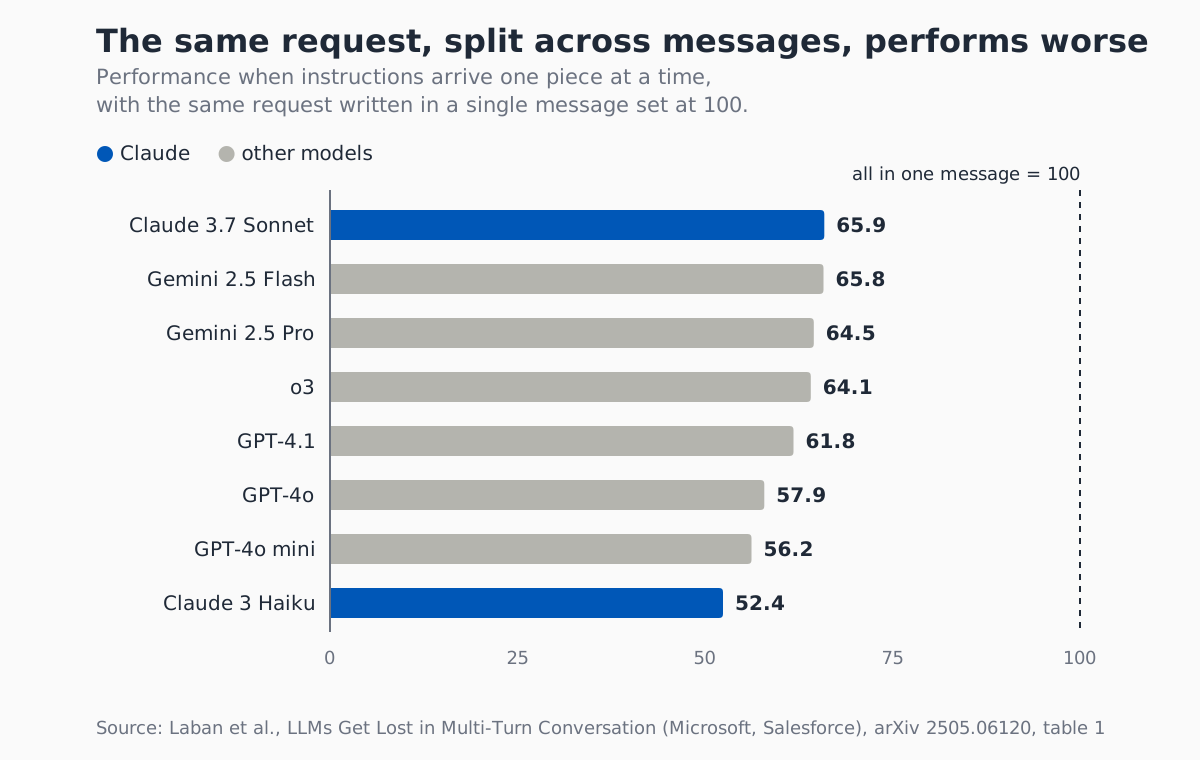
Near the window limit a second effect kicks in: compaction. When claude.ai shows that it is compacting the conversation so you can keep chatting, Claude is summarizing older messages to make room.
Anthropic's guide explains that this happens on paid plans with code execution on, and that compacted conversations use up more of your usage limits. In Claude Code compaction triggers on its own just before the limit, and the documentation warns that instructions given early in the conversation can get lost. Summarizing means choosing what to keep, and details are the first thing to go.
I use four signals:
- You switch tasks. Even inside the same project: the previous work stays in context and acts as a distractor.
- Two corrections did not do it. It is the rule in the Claude Code best practices: after two failed corrections,
/clearand a better prompt instead of a third one. - Compaction kicks in. From then on you are working on a summary.
- Claude forgets a rule given at the start. If it always applies, it doesn't belong in a message: it belongs in the project instructions.
Before closing a long chat, one thing is worth saving: ask Claude to write the decisions made and where you are in a few lines, and paste them into the new chat. You start again with the right information and without the failed attempts, which is also what the Microsoft and Salesforce study recommends.
How to organize Claude at work: one procedure, one folder
The chat is disposable, the project isn't. Claude keeps memory separate by projects and folders, and that is what pays off at work: every recurring activity that always works on the same files deserves its own project, with its own instructions, files and memory.
Here is how it works in the three environments:
- claude.ai. A project is a space with its own instructions, files and chats, and it has separate memory: "Each project has its own memory", says the memory guide. When the project files approach the context limit, on paid plans Claude switches on its own to searching the documents and capacity grows up to 10 times.
- Cowork. Folder instructions add the project context when you select a folder on your desktop, and Claude only reads and writes in the folders you connected. Here too projects have their own memory: "What Claude learns in one project doesn't carry over to other projects."
- Claude Code. The folder's CLAUDE.md sets the rules, and auto memory is one per repository: at the start of every session Claude loads the first 200 lines of its index. How to structure the folders is in my guide to Claude Code projects.
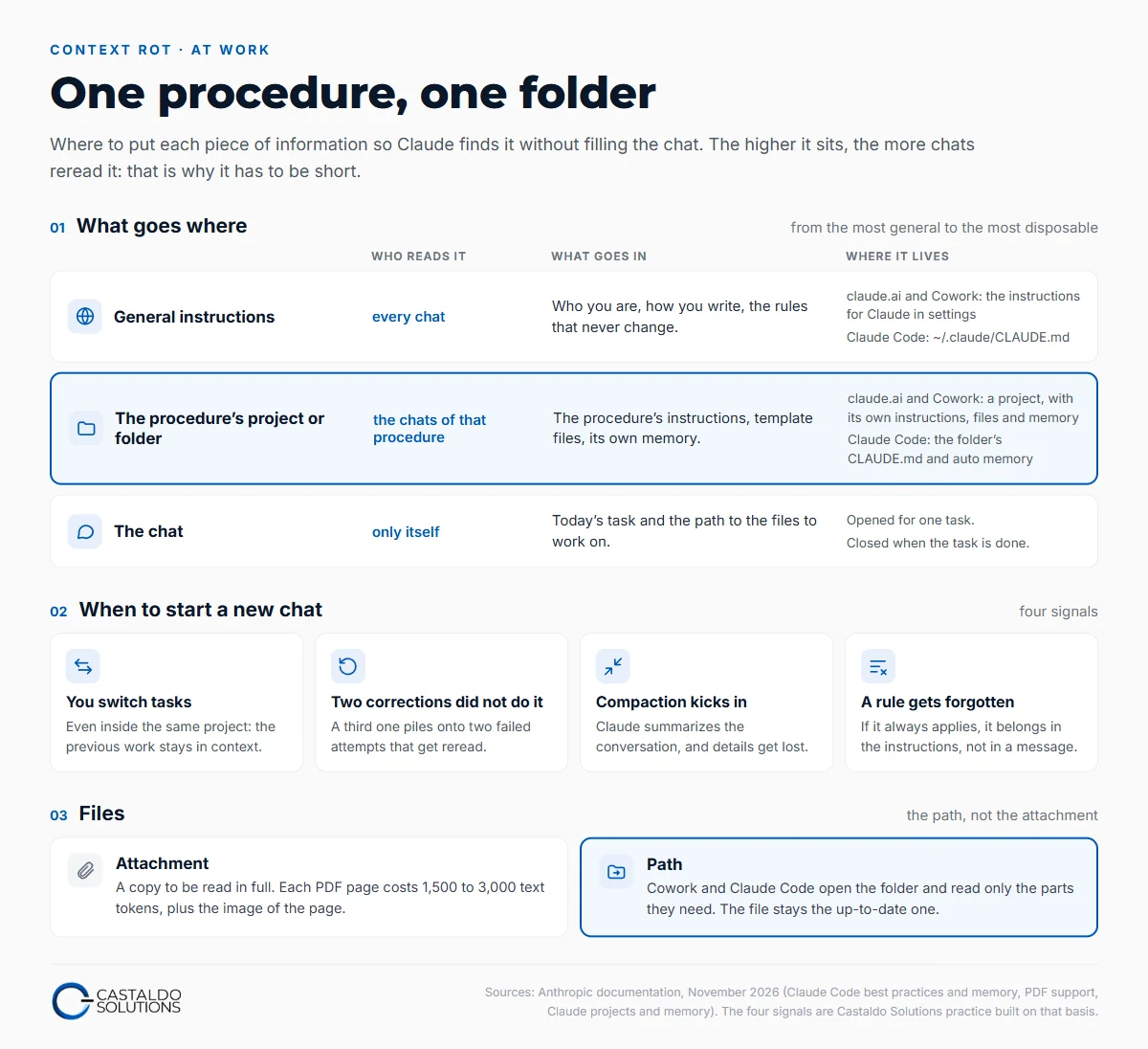
This is what I do. As of November 8, 2026, on one of my PCs, there are 42 project folders with their own memory, 362 notes in all: every client and every recurring job has its own, and what Claude learns in one doesn't pollute the others. Repetitive procedures follow the same rule: quotes, meeting minutes and mileage reimbursement have their instructions written once, in a skill or in the project instructions. The chat only says what to do today and where the files are, and when the job is done it gets closed.
If you want to start with just one thing, start with attachments. Next time you are about to drag an Excel file into the chat, put it in a folder and give Cowork the path.
Frequently asked questions
Does Claude remember previous chats?
Yes, if memory is on. Claude saves individual topics to memory as you chat, not summaries of whole conversations, and each project has separate memory: what it learns in one project doesn't carry over to the others. On paid plans it can also search past chats, and incognito chats are not saved. In Claude Code memory lives in files: the folder's CLAUDE.md and the repository's auto memory, which stays on the computer you work on.
What happens when Claude compacts the conversation?
When a chat approaches the limit of the context window, Claude summarizes the oldest messages to keep going. In claude.ai this happens on paid plans with code execution on, and a compacted conversation uses up more of your usage limits. The summary keeps the thread but loses details, and the Claude Code documentation warns that instructions given at the start can get lost. Rules that must always apply belong in the project instructions or in CLAUDE.md.
Does a 1 million token window solve context rot?
No. A larger window increases how much text Claude can hold, not how well it uses it. Anthropic says so in its documentation: more context isn't automatically better, because accuracy and recall degrade as tokens grow. On the MRCR v2 test at one million tokens, in the February 5, 2026 launch, Claude Opus 4.6 scores 76% and Sonnet 4.5 18.5%. The large window is useful, but the context still has to be kept clean.