Claude Code: Skills, CLAUDE.md and MCP - The Complete Guide to Getting Started

Claude Code is Anthropic's command-line interface for using Claude directly in the terminal, integrated with your development environment. It is not an editor with a chatbot added: it is an AI agent that reads your project, executes commands, writes code and works in autonomous loops. It can be configured to remember the context of each project, execute repeatable behaviors on request and connect to external tools in real time.
What sets Claude Code apart from other AI assistants is not the model, but three mechanisms that most users do not configure: skills, the CLAUDE.md file and MCP servers. This guide explains what each one does and where to find guides to use them well.
What Is Claude Code and How Does It Work
With a generic AI assistant, every conversation starts from zero: you have to re-explain the project, the conventions, the technical stack. The result depends on how well you wrote the prompt on the fly.
Claude Code works the opposite way. You can define the context once (who you are, what the project is, how you work) and Claude reloads it automatically every session. You can create repeatable, precise behaviors. You can connect Claude to your business tools.
The three mechanisms that make all this possible:
| Mechanism | Function | Where it lives |
|---|---|---|
| CLAUDE.md | Project memory, read automatically at every session | Root of the project + global ~/.claude/CLAUDE.md |
| Skill | Repeatable behaviors triggered by a command (/deploy, /new-article) |
.claude/skills/ of the project or global ~/.claude/skills/ |
| MCP Server | Connection to external tools (CRM, DB, APIs) in real time | .mcp.json of the project |
CLAUDE.md: the File That Replaces Repeated Instructions
Every time you open a session with Claude Code, the CLAUDE.md file is loaded automatically, without you asking. It contains everything Claude needs to know before starting: technical stack, naming conventions, critical files, deploy workflow, communication rules.
A well-structured CLAUDE.md does three things: eliminates repeated instructions, makes Claude's behavior consistent between sessions, and becomes useful documentation for human developers on the team. In Castaldo Solutions projects, a well-written CLAUDE.md reduces alignment time between sessions to zero.
Practical rule: if you find yourself explaining the same thing to Claude twice in different sessions, that thing goes in CLAUDE.md.
Where to learn more: CLAUDE.md: how to write instructions that really change Claude s behavior - structure, sections, real examples and what to avoid.
What Are Claude Code Skills
A skill is a folder with a SKILL.md file at its center. It contains structured instructions, references and examples: everything Claude needs to execute a specific task with consistent precision. It is activated with a slash command like /new-article or /deploy.
The difference from a prompt in chat: it is modular (context arrives only when needed), shareable (lives in git, all dev team members use it identically), and versionable (change the skill, change the behavior). In 2025 OpenAI adopted the same standard in ChatGPT and Codex CLI, with the /home/oai/skills structure that exactly mirrors the Anthropic format.
Where to learn more:
- What are Claude Code skills and how do they work - introduction for complete beginners, with concrete examples
- How to create a skill for Claude Code: practical guide - structure, writing and testing a skill from scratch
- The 8 skills that changed the way I work (and one to avoid) - real skills from daily workflow, with research on context rot
- Claude Code skills: best practices for writing and maintaining them - how to refine skills over time and avoid common mistakes
What Are MCP Servers and How to Use Them with Claude
MCP servers (Model Context Protocol) allow Claude to access external tools in real time during conversation: CRM, database, calendars, business management systems, company APIs. The protocol, published by Anthropic in October 2024, was adopted within months by OpenAI, Google DeepMind and Microsoft.
The practical result: instead of exporting data, opening dashboards and copying numbers into chat, you talk to Claude in Italian and he queries the system directly.
Where to learn more:
- MCP Server: what they are and why they change everything for SMBs - complete protocol explanation, use cases by department and adoption guide
- How we built an MCP Server for VTENext CRM with Claude - real integration case on an Italian CRM
How to Structure a Claude Code Project in VSCode
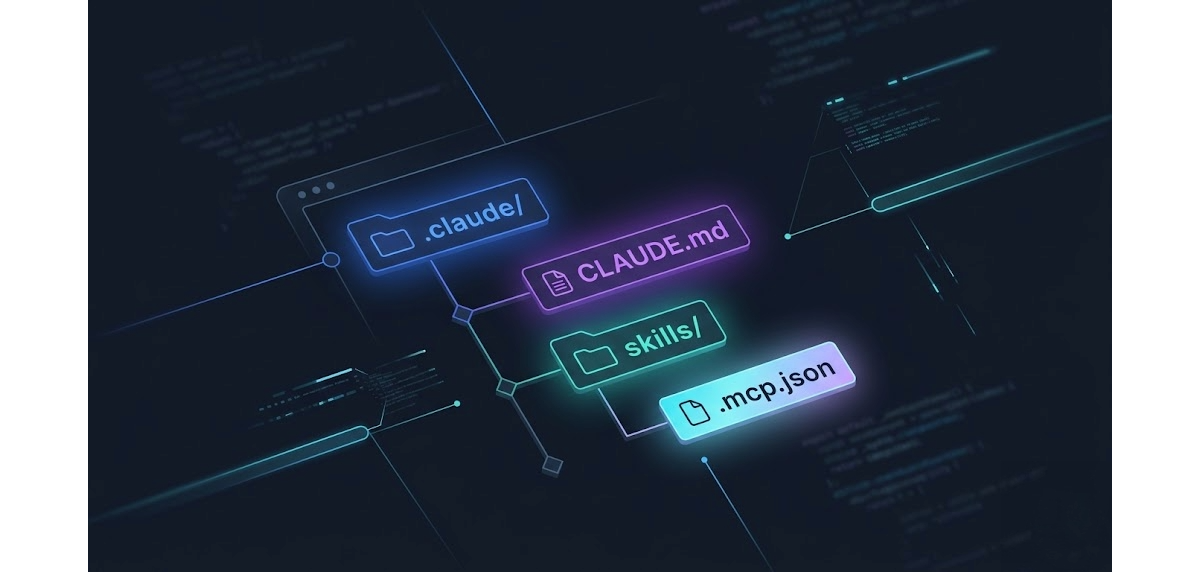
Skills, CLAUDE.md and MCP work well only if the project is structured correctly. The .claude/ folder, the .mcp.json file, the hooks: every element goes in the right place or Claude does not find it.
Infographics circulating online have errors in file names (.mcp.jason, .cl Claude/) that lead to configurations that break silently. The guide below uses the correct structure, verified on real projects, and explains what you really need vs what is optional.
Where to learn more: How to structure a Claude Code project in VSCode - practical guide with folders, files and explanation of every component.
Where to Start Based on Your Level
If you have never used Claude Code: Start with what skills are, then move to how to structure the project.
If you use Claude Code but informally: Read CLAUDE.md first - it is the change you feel immediately. Then the 8 skills from real workflow to understand what to automate.
If you are evaluating integration with business systems: Start with MCP Servers and the VTENext case.
Frequently Asked Questions About Claude Code
What is Claude Code? Claude Code is Anthropic's CLI interface that allows using Claude directly in the terminal, integrated with your development environment. Unlike a chatbot, it operates as an autonomous agent: reads the project, executes commands, writes and modifies code.
What is the difference between Claude Code and Claude.ai? Claude.ai is the conversational web interface. Claude Code is the terminal tool for developers: it has access to the local filesystem, can execute commands, read the entire codebase and operate in autonomous loops without constant supervision.
What are Claude Code skills?
Skills are reusable behavior modules: folders with a SKILL.md file containing structured instructions for a specific task. They activate with a slash command (/deploy, /new-article). They allow standardizing repetitive workflows and sharing them between team members via git.
What is the CLAUDE.md file for? CLAUDE.md is the configuration file that Claude reads automatically at the start of every session. It contains project context: technical stack, conventions, critical files, behavior rules. It replaces repeated instructions and makes Claude's behavior consistent between different sessions.
What is an MCP server for Claude? An MCP (Model Context Protocol) server is an intermediary that allows Claude to connect to external tools in real time: CRM, database, calendars, company APIs. Instead of copying data into chat, Claude retrieves and processes it directly during conversation.
Does Claude Code work on Windows? Yes. Claude Code works on Windows, macOS and Linux. On Windows it is typically used with Git Bash or WSL to maintain Unix syntax in commands.
Does Claude Code work with Fable 5 and the Claude 5 family? Yes. Claude Code uses the Claude 5 family models (Fable 5 is the first of the new tier, above Opus in capability) without changing anything in the configuration: CLAUDE.md, skills, MCP and hooks stay identical. Everything this guide describes also applies to the new models: the engine changes, not the method.
Want to Bring Claude Code to Your Team?
Configuring Claude Code right the first time takes time, but the results on team workflow are visible immediately. It's part of our AI services for SMEs: if you want to do it without spending weeks experimenting, let us talk and we'll set up the optimal configuration for your stack in a few days.